
Files and artifacts
Send Manas files, get images and files back, and open diagrams and pages it makes.
Send files
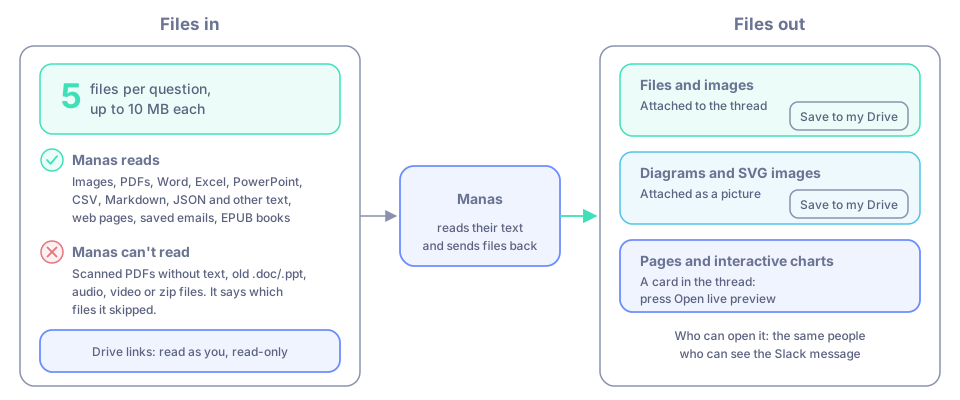
Attach files to your question, the same way you attach them to any Slack message. Manas reads their text.
- Up to 5 files, 10 MB each.
- Works with images, PDFs, Word (.docx), Excel (.xlsx and older .xls, every sheet), PowerPoint (.pptx), CSV, Markdown, JSON and other text files, web pages (.html), saved emails (.eml) and EPUB books.
- A photo over 2 MB is sent as a smaller preview Slack made of it. Manas also sees up to 6 of the newest images posted earlier in the thread, as previews.
Manas can't read scanned PDFs without a text layer, old .doc/.ppt files, audio, video or zip files as text. It says which files it skipped. Paste the text or send screenshots instead.
Big files
When a file is too big to read in full (over 10 MB, a very long document, a sheet over 2,000 rows) or can't be read as text (a scan, video, audio or zip), Manas gets a short preview of it, such as the sheet names, headers and first rows.
- In a DM, Manas hands the job to your cloud computer, which copies the whole file over and works on all of it. You don't need to send a link or a smaller file.
- In a channel, there is no computer. Manas answers from the preview and says it covers only part of the file. Press Analyse the full file on my computer under the answer to run the question on your own cloud computer.
File too big for Slack? See I have a big file.
Files from earlier in the thread
Ask a follow-up about a file someone shared earlier in the thread and Manas can still use it. It sees the names of files and Drive links posted in the thread in the last 30 days, and opens one only when your question needs it. Drive files follow the same rules as a link in your question (below). If a long file was cut short, the Analyse the full file on my computer button appears here too.
Files and images back
Files Manas makes, such as a file from your cloud computer or an image from Image Studio or a ChatGPT agent, are attached to the thread. If a file can't be attached, the link stays in the answer.
Save to my Drive
Under files Manas attaches there is a Save to my Drive button. Anyone in the conversation can press it. The file goes to their own Google Drive (My Drive).
The first time, Manas asks you privately to Connect Google Drive. Then press Save to my Drive again. Files up to 100 MB.
Google Drive links
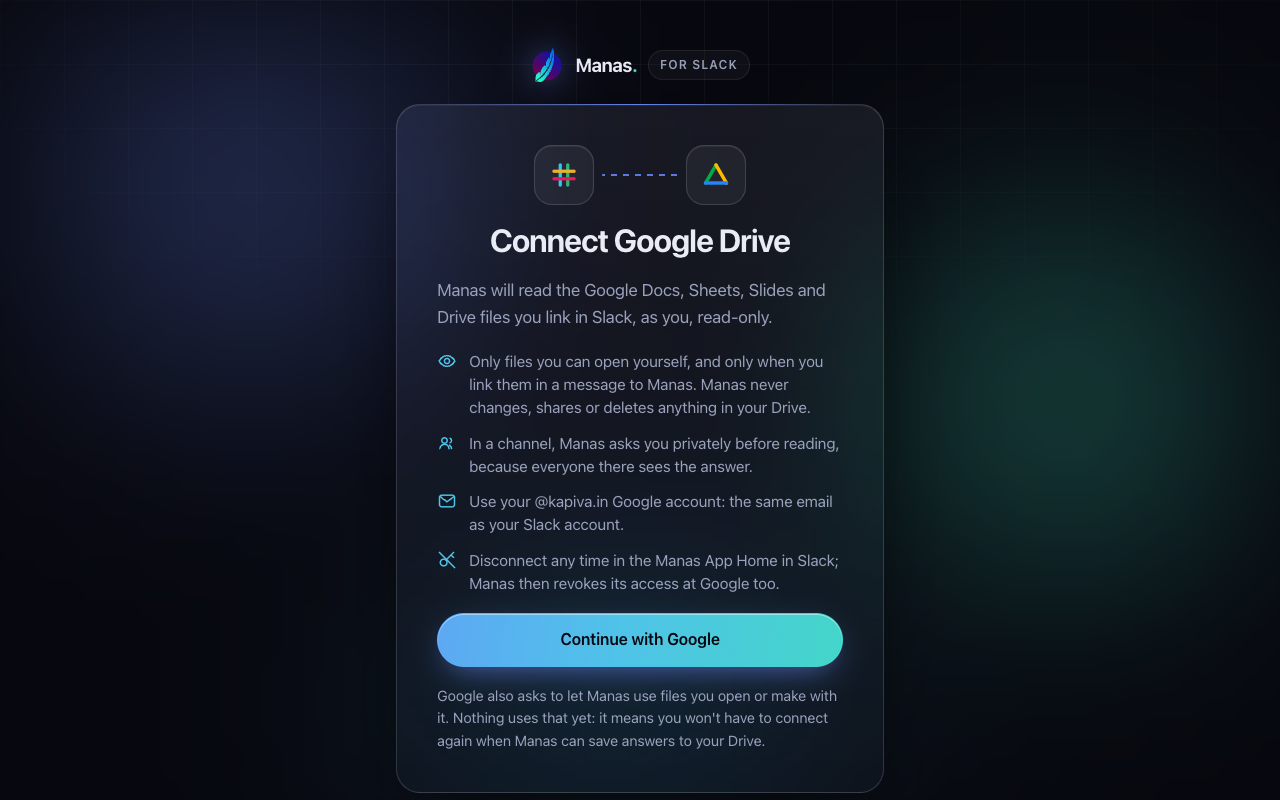
Paste a link to a Google Doc, Sheet, Slides deck or a Drive file in your question. Manas reads it as you, read-only: only files you can open yourself. It never changes, shares or deletes anything in your Drive.
The first time you share a link, Manas replies with a Connect Google Drive button. The Manas Home tab and /manas connect have it too, as Connect Google.
Click it, press Continue with Google and choose your @kapiva.in Google account, the same email as your Slack account.
The page says Google Drive connected. Go back to Slack and ask again.
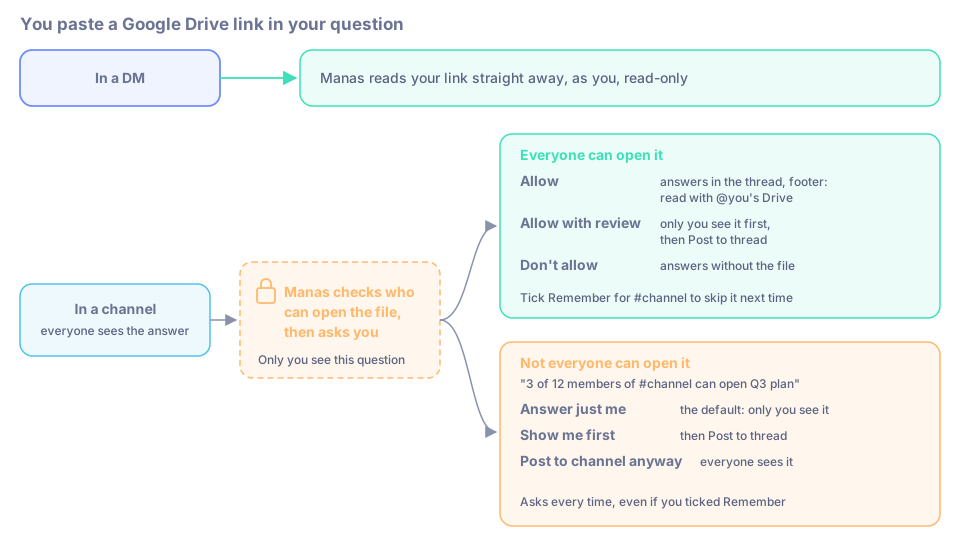
In a DM, Manas reads your links straight away. In a channel, everyone sees the answer, so Manas first checks who in the channel can open the file, and asks you privately.
If everyone in the channel can open it, Manas asks "Read Q3 plan with your Google Drive access? The answer will be visible to #channel."
- Allow: Manas reads the file and answers in the thread. The footer says read with @you's Drive.
- Allow with review: Manas shows the answer only to you first. Press Post to thread to share it.
- Don't allow: Manas answers without the file and says so.
Tick Remember for #channel to skip the question next time in that channel only.
If not everyone can open it, Manas says so, for example "3 of 12 members of #channel can open Q3 plan", "Only you can open Q3 plan" or "Manas couldn't check who in #channel can open Q3 plan". It asks every time, even if you ticked Remember:
- Answer just me (the default): the same question, answered as you, only to you.
- Show me first: only you see the channel's answer, with Post to thread.
- Post to channel anyway: answers in the thread for everyone.
For your own files that you share on purpose, tick Don't ask me in #channel, even for files not everyone can open and press Post to channel anyway. From then on Manas reads your Drive files in that channel without asking, also for your scheduled chats there. It's off unless you turn it on, and only for that channel. Undo it on the Manas Home tab with Ask me again.
See or reset your saved choices on the Manas Home tab, under Drive links in channels. Only your own questions use your Drive: if a colleague mentions Manas in the same thread with a link, Manas asks them about their Drive. Text Manas read from your Drive is never kept for later questions.
Folders aren't read in questions (only in scheduled chats): link the files inside. Up to 5 linked files per question, 10 MB each. More in Google Drive.
Diagrams, charts and pages (artifacts)
Ask for a flowchart, a diagram, a small dashboard or a web page, and Manas publishes it for you automatically:
- Diagrams and SVG images are attached to the thread as a picture, with Save to my Drive.
- Pages and interactive charts get a card in the thread. Press Open live preview. The page opens on manas.kapiva.tech after you sign in with your @kapiva.in Google account.
Who can open it: the same people who can see the Slack message. From your DM: only you. From a private channel: its members. From a public channel: anyone at Kapiva.
Share it: on the card press ⋯ → Share…. Add people (they get a DM from Manas with the link) or turn on Anyone at Kapiva with the link. Only the person who asked can share it. ⋯ → Remove… takes it down for everyone.
Change it: ask in the same thread ("add a total row"). The same link shows the new version and the card says v2, v3… Older versions stay in the version menu.
Live pages can save data and, if you allow it, use Manas AI as you or read your Drive. Only allow pages you trust. Reset in the page's footer takes your choice back.
Your artifacts are listed on the Manas Home tab under Artifacts. More in Live artifacts.
If something goes wrong
Manas couldn't read a linked Drive file. The note says why. Press Connect Google Drive or Reconnect Google Drive if asked. If you don't have access, ask the file's owner to share it. Otherwise paste the text.
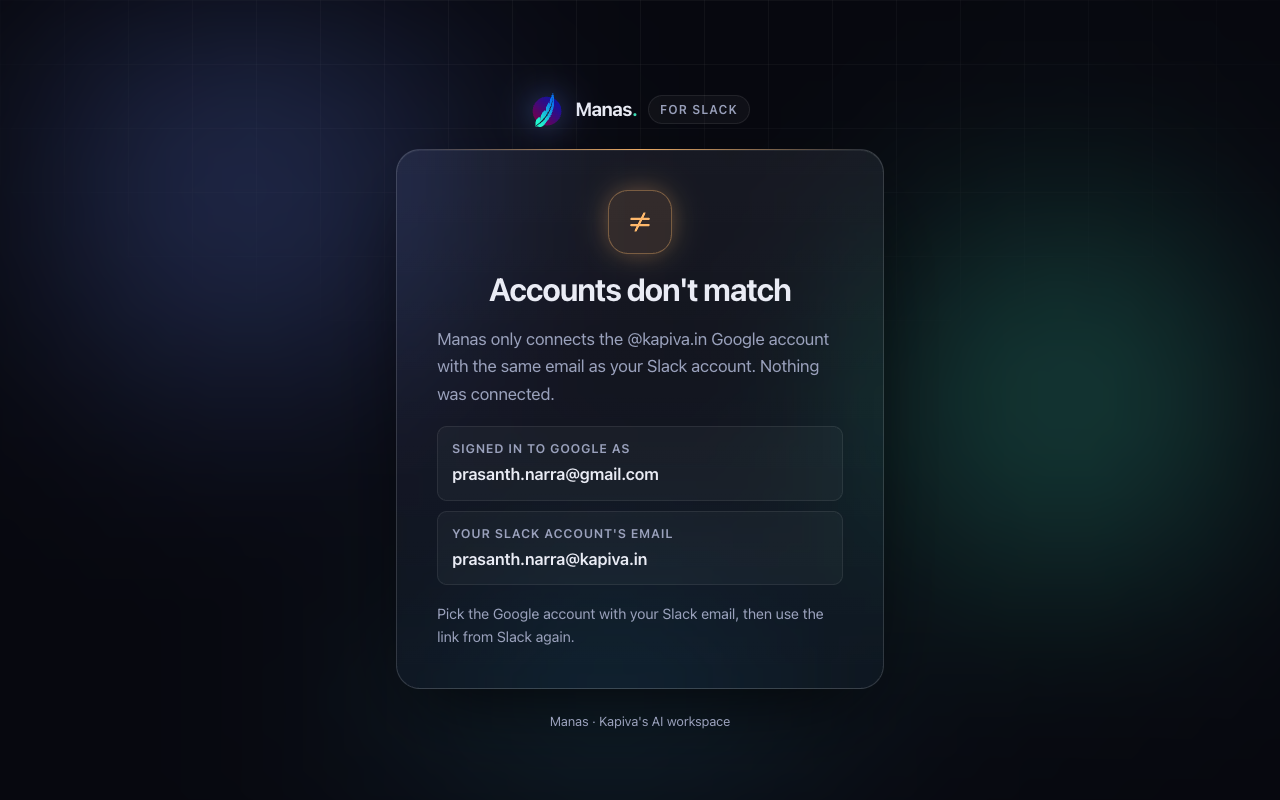
The Google Drive page says "Accounts don't match". You picked a Google account other than your @kapiva.in one. Use the link from Slack again and pick that account.
An artifact page says "No access". It came from a DM or a channel you're not in. Ask the person it names to share it with you.
A diagram arrives without a picture. Manas couldn't draw it. Its link still opens the diagram; ask Manas to fix it.