
Getting started
Write good requests
How to ask Manas so you get a useful answer on the first try, and how to pick the right model, tool or agent.
Manas works best when you ask the way you would brief a colleague: say what you want, give it the material, and say what you want back.
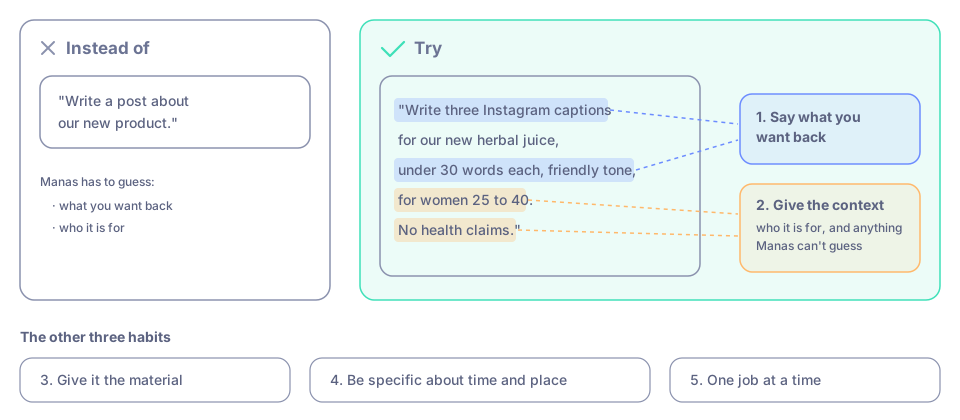
The same request, briefed like a colleague: say what you want back and give the context.
Five habits that help
- Say what you want back. "Five bullet points", "a table with one row per product", "a 100-word email", "an Excel file".
- Give the context. Who it is for, what it is for, and anything Manas can't guess. "For the retail team, who haven't seen the campaign yet."
- Give it the material. Attach the file, paste the text, or name the exact columns in your spreadsheet. Manas can't see what you don't share.
- Be specific about time and place. "Sales in Maharashtra, 1 to 30 September" is clearer than "recent sales".
- One job at a time. For a big task, go step by step in the same chat. Check each step before the next.
Before and after
| Instead of | Try |
|---|---|
| "Write a post about our new product." | "Write three Instagram captions for our new herbal juice, under 30 words each, friendly tone, for women 25 to 40. No health claims." |
| "Summarise this." | "Summarise this report in five bullet points for a busy manager. Put the numbers first." |
| "What's happening with competitors?" | "Search the web: what did the top three Ayurveda brands in India launch in the last three months? List each launch with its source." |
| "Analyse the sheet." | "Total the Amount column by month and draw a bar chart." (with Run Code on) |
Pick the right tool
| You want to… | Use |
|---|---|
| Rewrite, summarise, brainstorm, answer a question | A normal chat. See Choose a model. |
| Ask about a screenshot, invoice or PDF | Attach it with the paperclip. See Attach files. |
| Know something recent, with sources | Switch on Web Search. See Web search. |
| Get exact totals, cleaned data or a chart from a spreadsheet | Switch on Run Code. See Run code. |
| Make a picture or an ad creative | ChatGPT Images or the Image Studio agent. See Make images. |
| Get a small web page, diagram or dashboard | Ask for an artifact. See Artifacts. |
| Ask about Kapiva's business data | The Tattva agent. See Tattva. |
| Make a script or a video | The Kala agent. See Kala. |
| Have something done on a website for you | The Computer agent. See Cloud computer. |
When a job keeps coming up, check the Agent Marketplace first: someone may already have built an agent for it.
When the answer isn't right
- Say what is wrong. "The March total should be higher. Dates in the file are day-first." Then ask again.
- Edit your question instead of piling on corrections. Changing your original message gives a cleaner answer. See Your conversations.
- Get a second opinion. Pick another model from the model menu and ask again in the same chat.
- Start fresh. A new chat helps when a long one has gone off track.
Good to know
- Manas can be wrong, especially about facts, numbers and anything recent. Check what matters, and use web search to get sources you can click.
- Don't paste passwords or other secrets into a chat.
- Short, clear requests also use less of your daily allowance.