
Skills
Save a task you repeat as a skill, a short how-to that Manas follows the same way every time you ask.
A skill is a saved how-to: a short name, one line on when to use it, and the steps. Write it once, and Manas follows the same steps every time you ask for that task. Agent instructions say what an agent is for; a skill says how to do one specific job well.
For example, a skill can describe your weekly ad report, a review checklist, a reply template, how to write a static ad or how to brief Kala.
Manas uses skills. To save, change or delete one, Manas hands you to Manas Builder, which prepares it; nothing is saved until you confirm it on the card. You can also write a skill yourself in Manas web → Skills.
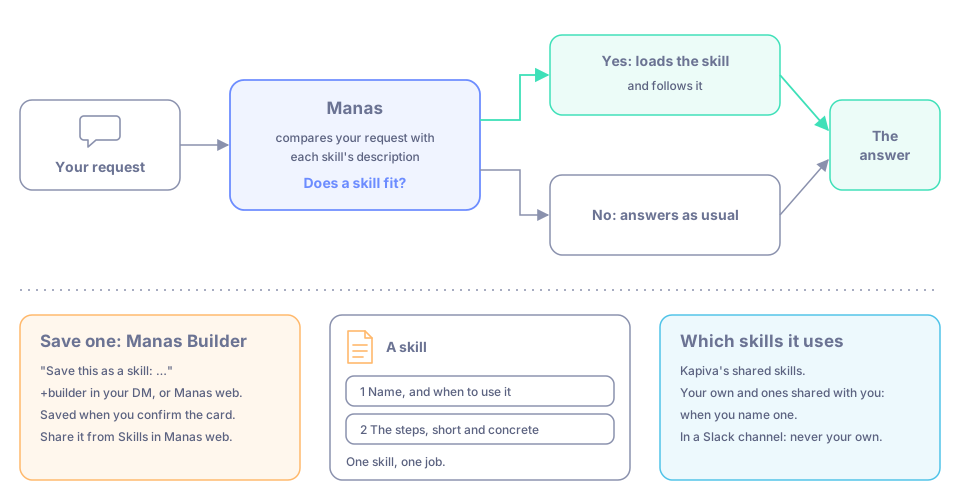
Manas picks up a skill when your request fits it. Manas Builder saves one once you confirm.
When to use one
- A task you ask for often, done the same way: a weekly report, a review checklist, a reply template.
- A format your team always wants: headings, tone, what to include and what to leave out.
- Steps you keep pasting into chats.
Save a skill with Manas Builder
Ask Manas Builder
In your Slack DM with Manas, start your message with +builder. In Manas web, chat with Manas Builder. If you ask Manas to save a skill, it hands you to Manas Builder. In a channel, ask in your DM or in Manas web instead.
Say what to save
For example: "Save this as a skill: the weekly ad report. Use it when I ask for the ad report. Steps: …" You can also do the task once and then say "save what we just did as a skill".
Confirm the card
Manas Builder writes the skill and shows it on a card. Nothing is saved until you press Confirm. Only you can see it.
Use it
Next time, name it: "use the weekly-ad-report skill", or ask Manas to follow your saved procedure for the task.
Changing or deleting a skill works the same way: ask Manas Builder and confirm the card. See Build with Manas Builder.
See, change and share your skills
Click Skills in the icon rail on the left. The panel lists the skills you can use, by name. From here you can read, change or delete a skill, add one yourself with +, or share one with colleagues.
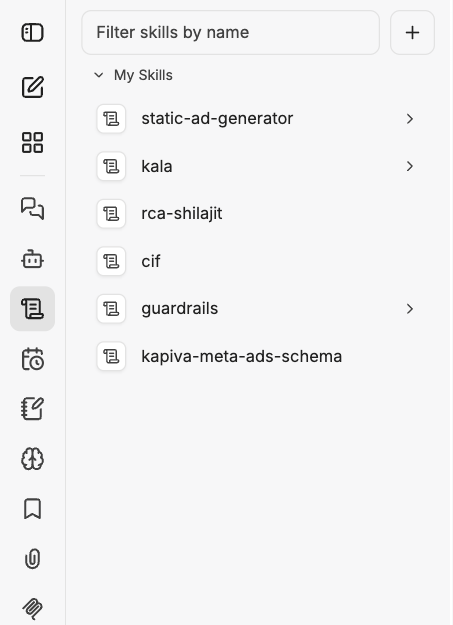
The Skills panel lists the skills you can use.
To add a skill by hand, click + at the top of the panel. A skill is written as a SKILL.md file: a short description of when to use it, then the steps. Then start a chat, ask for the task, and check the answer follows the skill.
Which skills Manas uses
- Kapiva's shared skills (shared with everyone): Manas knows them and uses one when your request fits it.
- Your own skills, and skills a colleague shares with you: Manas looks them up when you name one or ask for a saved procedure.
- In a Slack channel, Manas answers as the channel, not as you. It uses only skills shared with everyone or with channels, never your private ones.
You don't switch a skill on in a chat. If no skill fits, Manas answers as usual.
Good to know
- Skills you save are private to you until you share them from Skills in Manas web.
- Write the skill's description clearly. Manas uses it to decide when the skill applies.
- One skill, one job. Short, concrete steps work better than long essays.
- Never put passwords or other secrets in a skill.
- To build a whole assistant for a job, with its own model and tools, see Build your own agent.