
Built-in agents
The agents Kapiva runs on Manas, what each one is for and where to use it.
These are the agents the Manas team and Kapiva teams run for everyone. Find them in the Agent Marketplace, or just ask Manas and it hands your request to the right one. Image Studio, Tattva and Computer hand anything that isn't their job back to Manas. See How agents hand off.
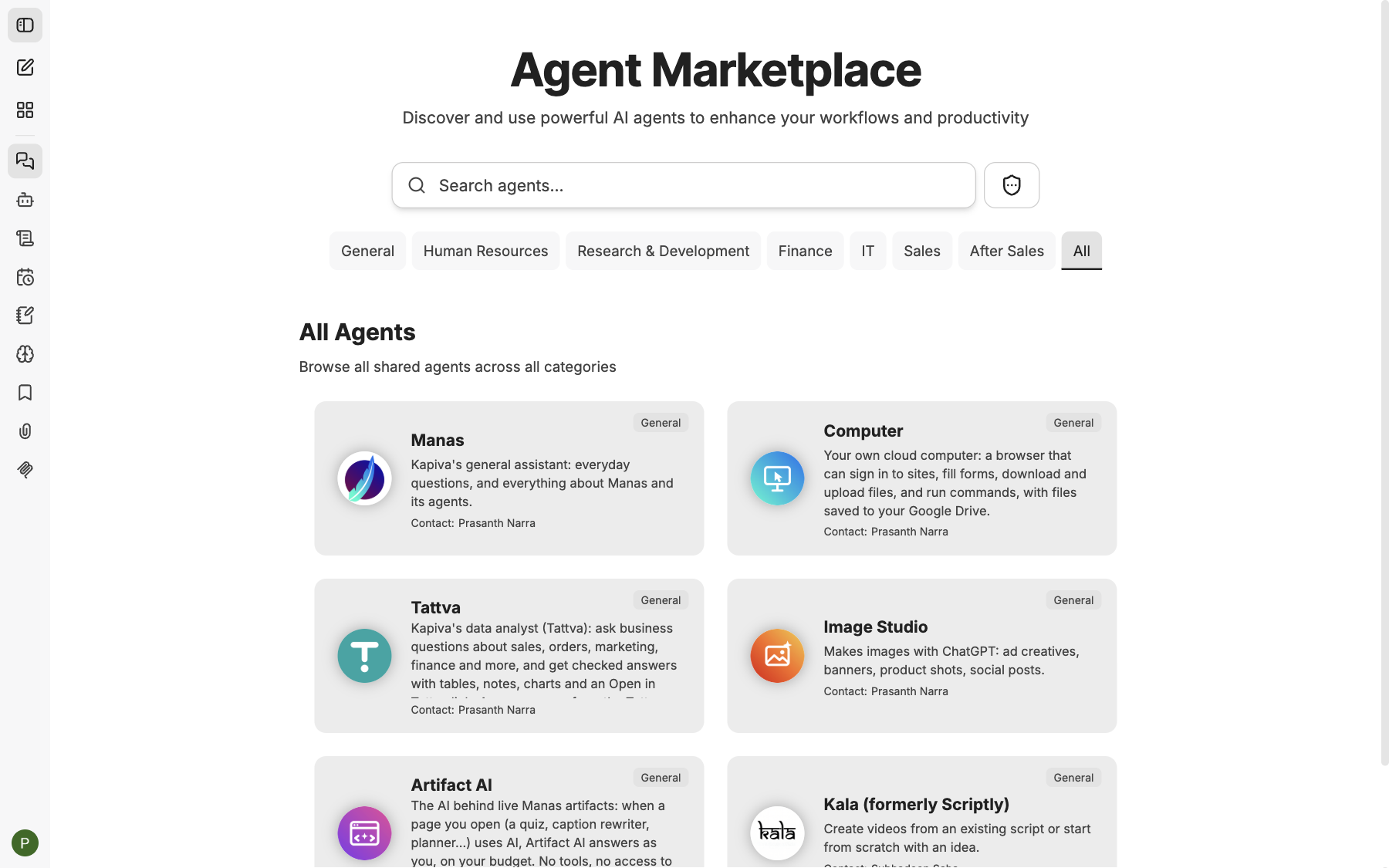
The built-in agents in the Agent Marketplace.
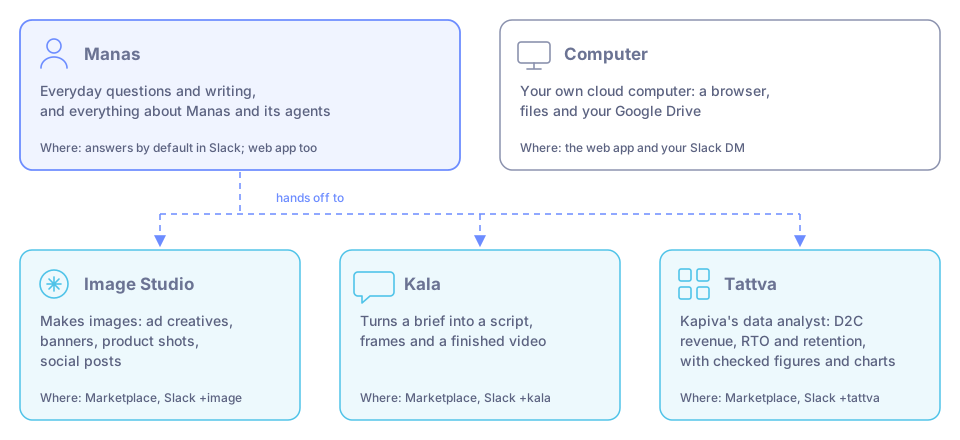
The main built-in agents, what each one does and where to find it.
Manas

Kapiva's general assistant: everyday questions and writing, and everything about Manas and its agents. It searches the web, works on small files, works with your Google Drive, makes diagrams and pages, and follows skills. When another agent fits the job better, it hands off.
- Where: answers by default in Slack. In the web app, pick it in the Agent Marketplace or under Select a model → Agents.
- Hands off to others: yes. Agents that hand back come back to Manas.
- More: The Manas agent.
Image Studio

Makes pictures with ChatGPT: ad creatives, banners, product shots and social posts. Tell it what the image is for; if you don't say the shape, it asks once (square post, portrait story or landscape banner). For a change, it makes a new image with the change.
- Where: the Agent Marketplace, and Slack with
+image. - Manas hands off to it when you want a picture made or changed. Diagrams, flowcharts and data charts are made by Manas instead.
- Hands back to Manas anything that isn't a picture, such as data questions, writing, diagrams or files.
- It can't edit a photo you attach. It makes a new picture in that style from a description of your photo. For an exact product shot, edit the real photo in a design tool.
- It only puts text on an image that you gave it. For claims on a creative, give it the exact wording.
- More: Images.
Kala
Kapiva's video agent, the new version of Scriptly. It goes from a short brief (or your own script) to a script, a first frame for every scene, single-frame edits and a finished video. You check each step before the next.
- Where: the Agent Marketplace, and Slack with
+kala. - Manas hands off to it when you want a video, a video script or ad frames.
- Kala doesn't hand back. Once a Slack thread is with Kala, or you started a web chat with Kala, every message goes to Kala. Start a Slack message with
+manas, or a new web chat with Manas, to get Manas back. - Kala has its own limits per person: 20 frame sets an hour, 40 frame edits an hour and 5 videos a day.
- More: Kala.
Tattva

Kapiva's data analyst. Ask a business question and get Tattva's checked answer: tables, notes, charts and an Open in Tattva link. It passes Tattva's figures on exactly as Tattva computed them, and can build a dashboard or page from them.
- Covers today: D2C (Kapiva's own website and app) revenue, RTO and retention only. For anything else it says so in one line.
- Where: the Agent Marketplace, and Slack with
+tattva. - Manas hands off to it for questions about Kapiva's figures when you haven't given a file. A file you attach goes to Manas or Computer instead; Tattva can't read files.
- Hands back to Manas anything that isn't a data question, such as pictures, writing or files.
- Answers come from the Tattva projects you belong to. In a Slack channel, Tattva answers as the channel, so a Tattva project admin must add the channel first.
- More: Tattva.
Computer

Your own cloud computer: a browser that can sign in to sites, fill forms, download and upload files, and run commands, with files saved to your Google Drive. It also works on big files you give it, such as a large spreadsheet, a PDF, or a video or audio file to convert. You watch it work live in the chat and can take control at any time.
- Where: the web app, and your Slack DM with Manas. Pick Computer in the Agent Marketplace, or under Select a model → Agents in a new chat.
- Manas hands off to it for big files, video or audio edits, websites and long jobs.
- Hands back to Manas anything that isn't work on your computer, such as pictures, general questions, or Kapiva figures when you give no file.
- It asks you before it submits a form, sends a message, pays, or deletes or overwrites anything you didn't ask for.
- In MCP Settings, its connected tool is called Cloud Computer.
- It is not used in Slack channels, because a channel would share one computer.
- More: Cloud computer.
CIF
The Creative Insight Framework. It gathers what people search for on Amazon, say on Reddit and trend on Google, plus what competitors run in Meta ads, and turns it into ideas for your ad creative.
- Where: depending on how it was shared with you, as tools you switch on in a chat, or as an agent called CIF in the Agent Marketplace.
- More: CIF.
Artifact AI
You don't chat with this one, even though you may see it in the Agent Marketplace. It is the AI behind live pages made in Manas: when a page you open (a quiz, a caption rewriter, a planner) uses AI, Artifact AI answers, as you and on your allowance, after you allow it. It has no tools, no memory and no access to your files or Drive. Manas never hands off to it. See Live artifacts.
Good to know
- Each agent's start screen shows Contact: with its owner. Ask them if the agent misbehaves.
- The agent you chat with uses your memory, in Manas web and in your Slack DMs; answers in a channel don't. Only Manas changes it, when you ask and confirm the card. Manas, Tattva and Computer can make artifacts, such as a page or a dashboard, and publish them for you.
- All of these agents use your daily allowance, like any chat. Kala also has its own limits.
- Want an agent of your own? See Build your own agent.
The Manas agent: when it answers, hands off and hands back
Exactly which requests Manas answers itself, which it hands to another agent, when an agent hands back to Manas, and what you see in the web app and in Slack.
Build your own agent
Create an agent for a job you do often, give it instructions, a model and tools, and test it.