
Welcome to Manas. Your AI workspace at Kapiva.
Manas is Kapiva's AI workspace. Chat with Claude, Gemini and ChatGPT, hand work to specialist agents, give them a private cloud computer, and use all of it from Slack.
- 01Getting startedQuickstart · A tour of the screen · Your daily allowance · 1 more
- 02Chatting with ManasChoose a model · Attach files · Web search · 10 more
- 03Agents & agentic AIWhat are agents? · The Agent Marketplace · How agents hand off · 7 more
- 04Cloud computerWhat the cloud computer is · Your first request · The live view and taking control · 4 more
- 05Manas in SlackManas in Slack · Manas on the web vs in Slack · Connect your account · 13 more
- 06Connected toolsTattva, your data analyst · Kala, the video agent · Google Drive · 2 more
- 07Privacy & limitsData & privacy · Usage limits · Who sees what
- 08ReferenceFAQ · Troubleshooting · Glossary · 1 more
Manas is where Kapiva works with AI. You ask in plain English, in the browser at manas.kapiva.tech or in Slack, and Manas answers, or passes your request to the agent built for it.
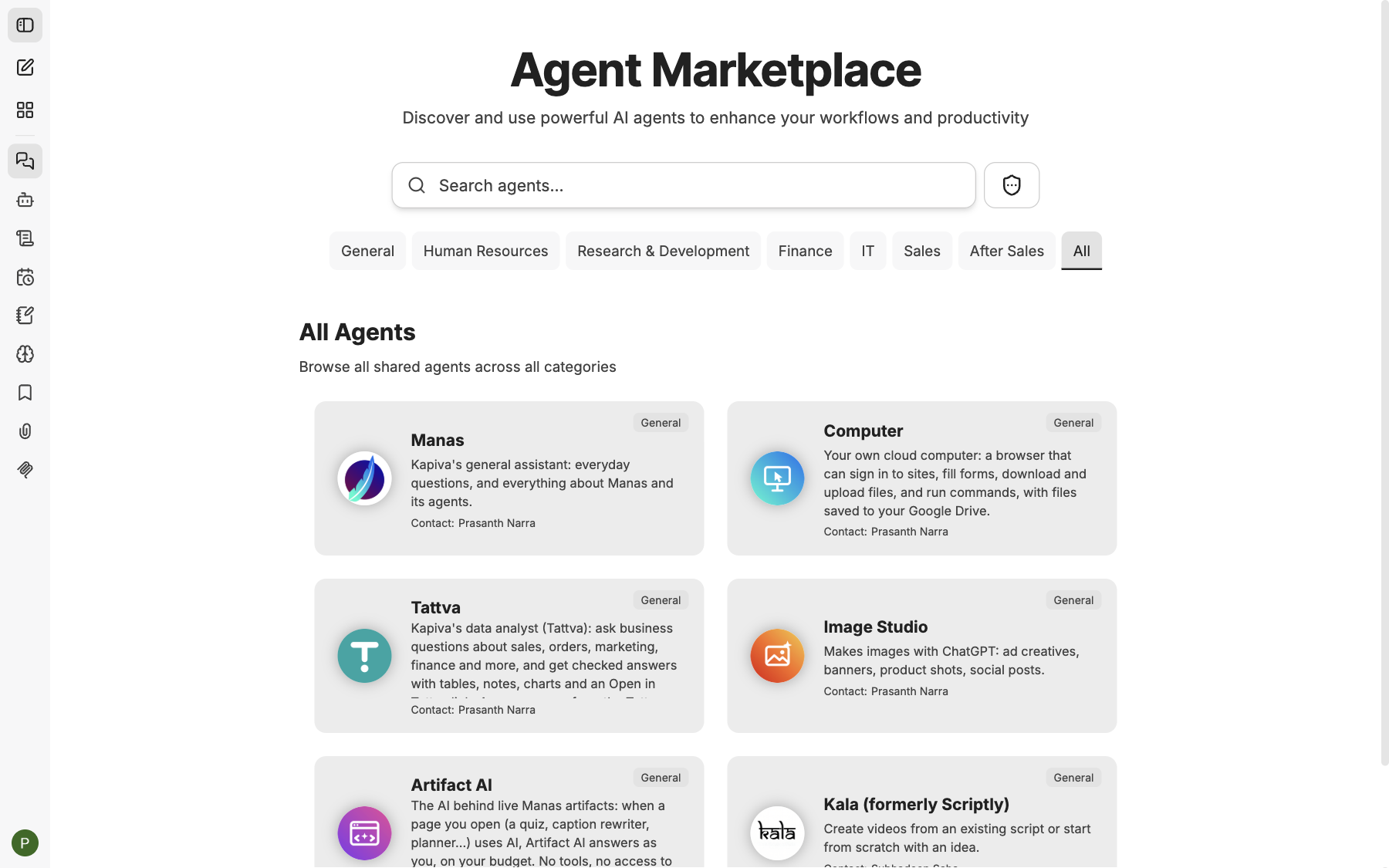
The home page is the Agent Marketplace: every agent you can use, one click away.
What you can do with it
- Chat with the best models in one place. Claude, Gemini and ChatGPT, side by side. Attach images and PDFs, search the web with sources, and run code for charts and number-crunching. See Choose a model.
- Hand work to specialist agents. Image Studio makes images, Kala makes videos, Tattva answers business questions from Kapiva's data. You don't need to know which one to pick: the Manas agent hands your request to the right one. See How hand-offs work.
- Let agents do things for you. With your own cloud computer, an agent can browse websites, download and convert files, and save them to Google Drive while you watch. See Cloud computer.
- Use your Google Drive. Find, read and create Docs and Sheets from a chat. See Google Drive.
- Work from Slack. Message Manas directly, @mention it in a channel, or use
/manas. See Manas in Slack. - Put repeat work on a timer. A scheduled chat runs an agent on your prompt every day, weekday or week. See Scheduled chats.
How Manas is put together
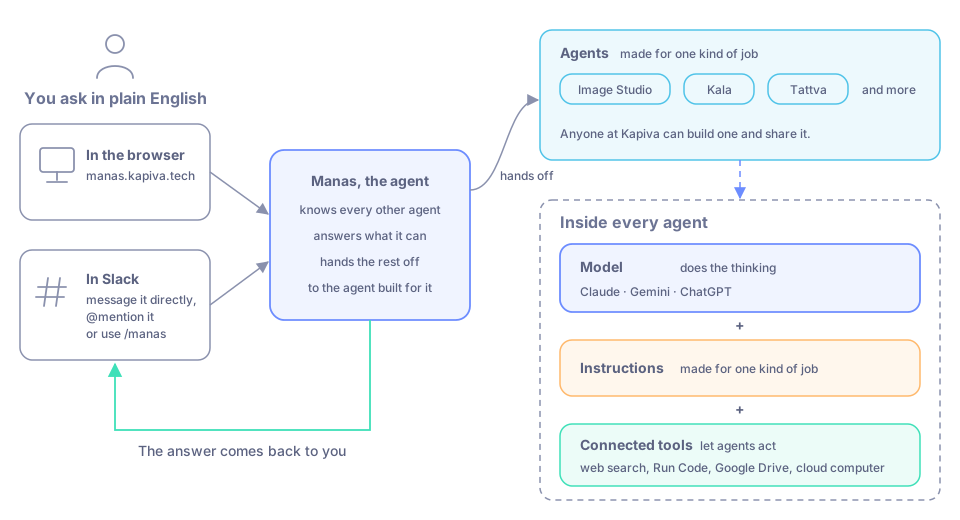
Ask in the browser or in Slack. Manas answers, or passes your request to the agent built for it.
- Models do the thinking: Claude (Anthropic), Gemini (Google) and ChatGPT (OpenAI).
- Agents are a model with instructions and tools, made for one kind of job. Anyone at Kapiva can build one and share it.
- Connected tools let agents act: web search, Run Code, Google Drive, the cloud computer, Tattva, Kala and more.
- Manas, the agent is the default you talk to in Slack and the one that knows every other agent. It answers what it can and hands the rest off.
Where to start
Quickstart
Sign in with your Kapiva Google account and send your first message.
A tour of the screen
What every button in Manas does.
Agents & agentic AI
What agents are, and how they pass work to each other.
Cloud computer
A private computer your agents can use for you.
Manas in Slack
Ask Manas without leaving Slack.
FAQ
Quick answers to common questions.