
Scheduled chats in Slack
Have Manas ask a question on a schedule and post the answer in your DM or a channel.
A scheduled chat is a question Manas asks itself on a schedule and posts as a new message, for example a weekly ROAS summary in a channel every Monday morning, or a morning brief in your DM with Manas.
Manas also has two built-in scheduled chats you can turn on: the Morning brief of your Slack, Gmail and calendar, and Dreaming, which reflects on your conversations each night and suggests what to finish or automate on Monday.
This is separate from the scheduled chats in the web app: the ones you make in Slack live in Slack and post there.
Create one
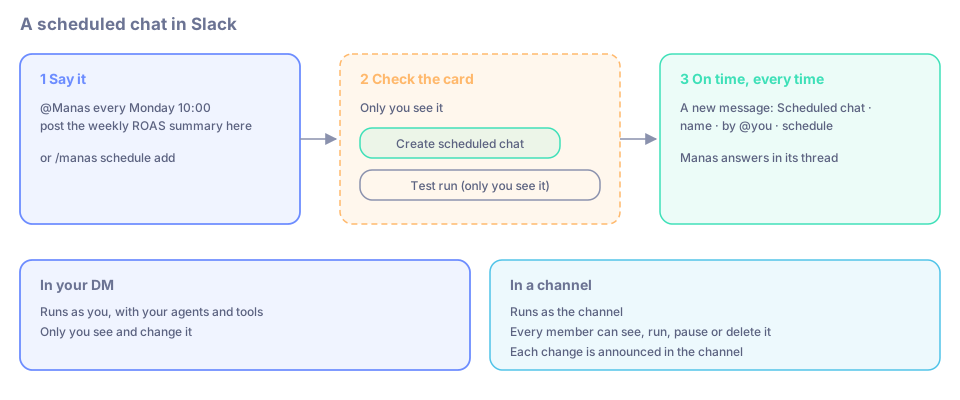
Just say it. In a channel: @Manas every Monday 10:00 post the weekly ROAS summary here. In your DM with Manas: every weekday 9am summarise my calendar. "create a scheduled chat every …" works too.
Manas shows you a card that only you see:
- Create scheduled chat saves it.
- Test run (only you see it) tries it once first.
- Answer now instead answers the question once, right now.
- Cancel drops it.
If the time is unclear, for example "at 9" without am or pm, Manas asks you back.
Type /manas schedule add "Summarise yesterday's orders" every weekday 9:00. It posts in your DM with Manas. Add in #channel to post it in that channel instead.
To pick the agent, start the question with + and its name, for example +tattva weekly ROAS by channel. Otherwise Manas answers.
Schedules you can use
every day 9:00,every weekday 9am,every Monday 10:00,every 2 hourscron 0 9 * * 1-5if you know cron- Times are India time (IST) unless you add a time zone, for example
9:00 Europe/London. - At most once an hour.
What a run looks like
At each time, Manas posts a new message, Scheduled chat · name · by @you · schedule, with the question under it, and answers in its thread. The answer is like any other: task cards, the footer, Switch agent and 👍 / 👎. Nobody is waiting on a scheduled run, so the agent doesn't ask you questions back; it does its best with what it has.
A "daily recap of this channel" is simply a scheduled chat whose question asks for one. See Catch up on a channel.
Your DM or a channel
| In your DM | In a channel | |
|---|---|---|
| Runs as | You, with your agents, tools and memory | The channel, with its agents and instructions |
| Who can see and change it | Only you | Every member can see, run, pause or delete it. Manas announces each change in the channel |
| Who can make one | Anyone connected to Manas | Any member of a channel where Manas is set up |
Test run
Test run (only you see it) runs the question once, as you, and answers in your DM with Manas. Then it lists the tools it used in plain words, counting repeats, for example Tools used: Searched your Slack ×3, Checked your calendar. Nothing is posted in the channel, and it doesn't count as a run. You find it on the create card, after creating, in /manas schedule list, in the ⋯ menu, or with /manas schedule test and the number.
See and change them
/manas schedule listlists yours (and, in a channel, that channel's), each with its number and buttons: Pause or Resume, Change time, Test run (only you see it) (yours only) and Delete. Delete asks Delete scheduled chat? first, with Keep. Change time opens a box for the new schedule, likeevery weekday 9:30. After each button the list updates in place, with what changed on top. Built-ins you haven't turned on are offered at the end, with Turn on.- In your DM with Manas the list is a normal message that stays; anywhere else (a channel, a group DM, another DM) only you see it.
- Typing works too:
/manas schedule pause,resume,runortestwith the number, and/manas schedule timewith the number and a new schedule, for example/manas schedule time k7m2p9qx every weekday 9:30(the number is the 8-character code the list shows)./manas schedule deletewith the number asks first too: Delete or Keep. - Ask Manas in your DM: "list my scheduled chats", "pause the ROAS one", "move my brief to 9:30". It reads your list and, for a change, shows a card with the exact scheduled chat and schedule: nothing changes until you press its button.
- The Manas Home tab has Scheduled chats.
- A channel's settings (
/manas settings) list Scheduled chats in this channel.
On the Home tab and in the settings, each one has a ⋯ menu: Run now, Test run, Change time…, Pause or Resume, and Delete….
You can't edit a scheduled chat's question: delete it and create a new one.
Built-in scheduled chats
The Morning brief and Dreaming sit at the top of Scheduled chats (and /manas schedule list) with a Built-in tag and the note "Built-in: turn on or off and change the time; can't be deleted." Your own scheduled chats follow.
- Their ⋯ menu has Test run, Change time… and Turn off or Turn on; under
/manas schedule listthey have Turn off or Turn on, Change time and Test run./manas schedule pause,resume,timeandtestwork on them too; Run now is a test run. - Delete turns one off instead and tells you so. You can't edit their question: the instructions are built into Manas.
- They run only in your DM with Manas, as you, and don't count toward your 10 scheduled chats.
Google Drive files and folders
Put Drive links in the question, or add one later with /manas schedule file, the number and the link. Up to 5 per scheduled chat. Unlike a normal question, a scheduled chat can read a folder: each run reads the files in it and its subfolders, up to 5 files per run.
- In your DM, they're read as you straight away.
- In a channel, Manas first shows you, privately, who in the channel can open each one. Press Allow for this scheduled chat or Don't include.
Every run checks again. If sharing got narrower since you allowed it, a new file in the folder isn't open to the same people, your Drive is disconnected or the file is gone, the run goes ahead without it. The post says "One source couldn't be read this time; @you has been notified", and Manas DMs you with what to do: Allow for this scheduled chat, Allow and re-run now or Ignore, or Review, Pause scheduled chat or Remove the file.
If you ticked Don't ask me in #channel, even for files not everyone can open for that channel, your scheduled chats there read your files without asking too. See Google Drive links.
Run it when something happens
An Activepieces workflow can run a scheduled chat when something happens, such as a new order or a form, and pass along what happened. Ask a Manas admin to connect it.
Limits
- Up to 10 scheduled chats per person and 20 per channel.
- Questions up to 4,000 characters.
- At most once an hour.
- Each run counts towards the usual limits and budgets, yours in a DM and the channel's in a channel.
If something goes wrong
It paused and Manas sent me a DM. It failed 5 times in a row, you disconnected Manas, or Manas left the channel. Fix what the DM says, then resume it.
The list says "interrupted by a Manas restart". Manas restarted during that run, so it counts as a failed run. The next one runs as normal.
"One source couldn't be read this time". A Drive file couldn't be read on that run. Check your DM from Manas and choose what to do.