
Manas in Slack
Rules and limits
How often you can ask, how long answers can take, file limits, channel rules and every message Manas might show you in Slack.
Manas in Slack has a few limits to keep it fair and safe for everyone. Most people never hit them. This page lists them all, and what each message means.
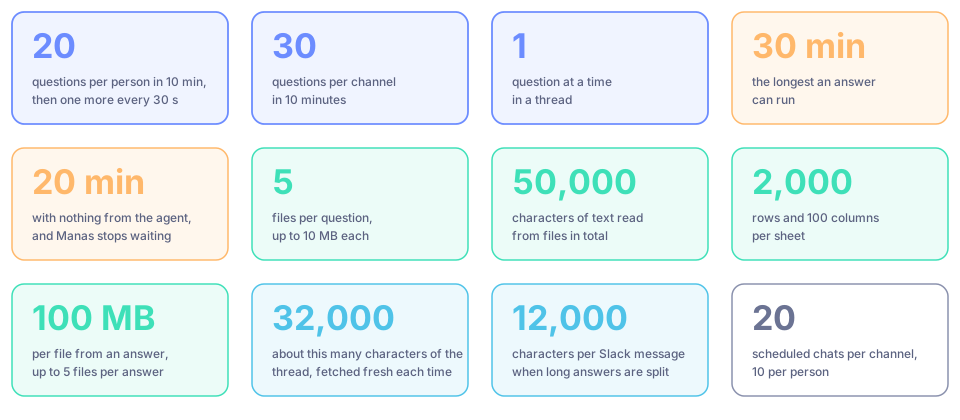
How often you can ask
| Limit | Value |
|---|---|
| Questions per person | 20 in 10 minutes, anywhere in Slack. After that, one more every 30 seconds |
| Questions per channel | 30 in 10 minutes, for answers as the channel |
| At once in a thread | One question at a time. Wait, or press Stop |
| Channel answers per person | A daily share of channel answers, across all channels. DMs don't count |
Messages you send in a followed thread while Manas is still answering are ignored.
Budgets
- In a DM or with
/manas, answers use your own daily allowance. See Usage limits. - In a channel or group DM, answers use that channel's own budget.
- When 90% of a day's budget is used, the next answer says so once, with when it refills.
- When your share of channel answers is used up, carry on in a DM with Manas, on your own allowance.
How long an answer can take
- An answer can run for up to 30 minutes.
- If the agent sends nothing at all for 20 minutes, Manas stops waiting.
- Press Stop to end an answer early. It ends with Stopped.
What Manas reads
- The thread, up to about 32,000 characters of it, fetched fresh each time you ask.
- Long answers are split into several Slack messages of up to 12,000 characters.
- Other channels, only if the channel turned on Slack read tools in its settings, and only public channels Manas is in. Manas never reads your other DMs or channels shared with other companies. In a DM with Manas, read tools are always on for you. Every read is logged.
- Edits, joins and bot messages are not questions. Editing your message doesn't ask again; send a new message instead. Earlier thread messages are read as they are now, so edits and deletions there count.
Files
| Limit | |
|---|---|
| Files per question | 5, up to 10 MB each |
| Text read from files | 50,000 characters in total. Bigger files get a preview; see Big files |
| Spreadsheets | 2,000 rows and 100 columns per sheet |
| Images | Large images are sent as a smaller picture |
| Google Drive links | 5 files per question, 10 MB each. Folders are read only in scheduled chats |
| Files from an answer | 5 per answer, up to 100 MB each |
Manas reads PDF, Word (.docx), Excel (.xlsx and .xls), PowerPoint (.pptx), email (.eml), ePub, web pages (.html) and text files such as .csv, .txt, .md, .json and .sql. Scanned PDFs, old .doc and .ppt files, audio and video are skipped, and the footer says how many files were skipped.
Channel rules
- Kapiva only. Guests, bots and people from other companies get no answers. Channels shared with other companies (Slack Connect) don't work.
- At least 2 people in the channel. Bots and guests don't count.
- No copies. At most 3 channels with exactly the same people can have Manas.
- Allowed agents. A channel can limit which agents may answer there. Any member can change this with
/manas settings. The list doesn't apply to private/manasanswers. - Agents shared for Slack. In a channel, only agents whose owner shared them with Manas for Slack channels (Remote access) can answer.
- No personal tools. In a channel Manas never uses your own connections without asking you privately first.
- Tattva answers as the channel. Personal data is hidden and nothing is saved to the project's memory. See Tattva.
- No memory: answers in a channel don't use anyone's memory, and a channel has none of its own. Channel instructions: up to 1,000 characters.
- Scheduled chats: up to 10 per person and 20 per channel, at most once an hour. See Scheduled chats in Slack.
What Manas never does
- It never answers as you where others can see it, unless you said yes privately first and pressed Post to thread yourself.
- It never posts in your name. Everything it posts comes from the Manas app.
- It never reads a channel's messages unless it was mentioned, a new message starts with
+and an agent's name, or the channel asked it to follow threads. - It never changes channel settings on its own. People do that with
/manas settings.
Need a human? and feedback
- Need a human? appears under channel answers when the channel set up people to tag. It tags them once per thread per hour.
- 👍 / 👎 under every answer. 👎 asks what went wrong.
Messages you might see
Only you see these messages, unless noted.
If something goes wrong
- Manas didn't react at all. In a channel, check that you mentioned @Manas. Then check for a private message from Manas in the channel.
- A file wasn't read. Check the type and size above. The footer says when files were skipped.
- See also Where you ask and Troubleshooting.