
Your daily allowance
How much of Manas you can use, what uses it up, and what happens when you run out.
Everyone at Kapiva has a fair usage allowance, so Manas stays fast for everyone. It is counted in credits.
How it works
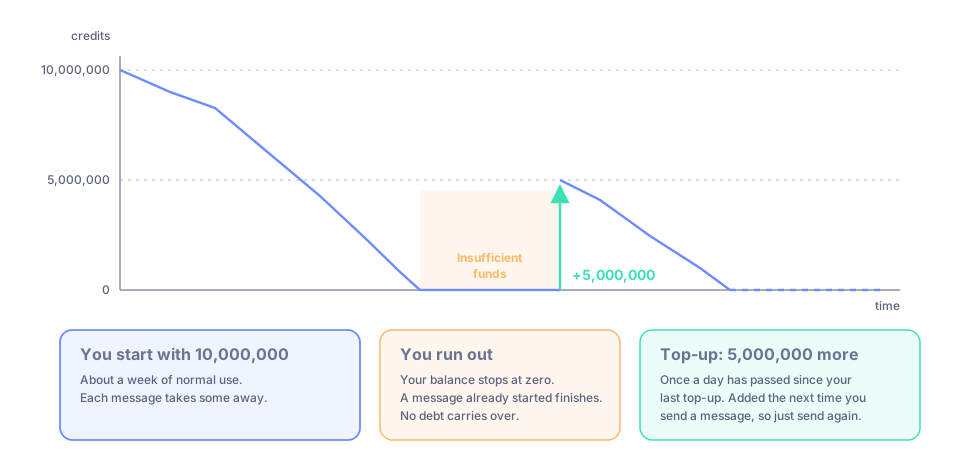
Start with 10,000,000 credits. When you run out, 5,000,000 more are added once a day has passed since your last top-up.
- You start with 10,000,000 credits. That is about a week of normal use.
- When you run out, you get 5,000,000 more once a day has passed since your last top-up. The top-up is added the next time you send a message, so just send again.
- The top-up adds to what you have. It does not reset you to a fixed amount, and it only happens when you have run out.
- Your balance never goes below zero. If a message starts while you still have credits, it finishes, even if it costs more than you had left. Nothing carries over as a debt to the next day.
What uses your allowance
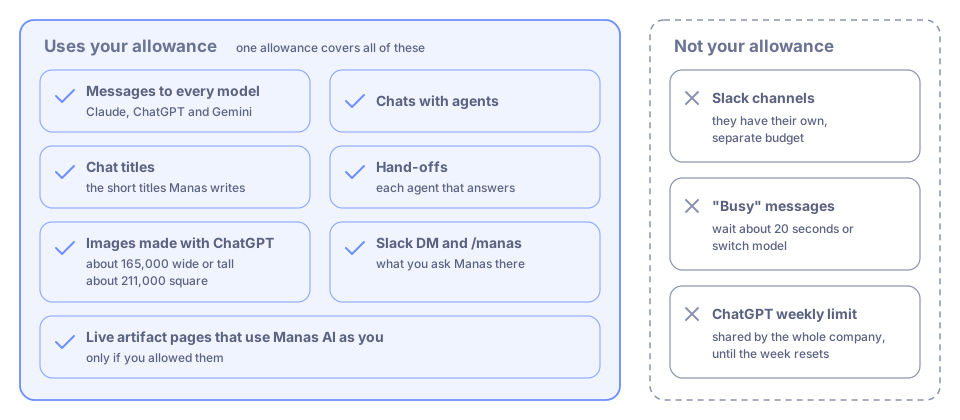
One allowance covers everything you do in Manas. A few limits are separate.
One allowance covers everything you do in Manas:
- Messages to every model: Claude, ChatGPT and Gemini.
- Chats with agents.
- The short titles Manas writes for your chats.
- Images made with ChatGPT: about 165,000 credits for a wide or tall image, about 211,000 for a square one.
- What you ask Manas in a Slack DM or with
/manas. Slack channels have their own, separate budget. See Manas in Slack. - Live artifact pages that use Manas AI as you, if you allowed them. See Live artifacts.
What makes a message cost more
- Long, careful answers. Claude and ChatGPT think before they answer, and the thinking counts. A detailed answer can use thirty times more than a quick one.
- Long chats. The whole conversation is sent with every message, so each new message in a long chat costs more than the last.
- Attached files. Files are sent again with every message in that chat.
- Web search. A searched answer uses more than a quick question, though usually less than a long, careful answer.
- Bigger models. A lighter model goes further on the same allowance.
Make it go further
- Start a new chat for a new topic, instead of carrying on in a long one.
- Use a lighter model for quick, simple questions: claude-haiku-4-5-20251001, gpt-5.6-terra or gemini-3.5-flash-lite. Claude Haiku uses about half as much as Claude Sonnet.
- Remove files you no longer need from a chat, or start a new chat for a new document.
Check your balance
Click your picture (Account Settings) at the bottom of the icon rail. Your account menu shows Balance followed by the credits you have left, for example Balance: 432,232.

Your remaining credits, in your account menu.
When you run out
You see a message like this instead of an answer:
Insufficient funds. Balance: … Prompt tokens: … Cost: …
What to do:
- Wait until a day has passed since your last top-up, then send the message again. The top-up is added when you send.
- Meanwhile, a new chat or a lighter model uses less, and may still fit in what you have left.
- If you really need more sooner, ask the Manas team.
Good to know
- The allowance is per person. Nobody else's use takes from yours.
- It is separate from "busy" messages. Claude and ChatGPT are shared by everyone at Kapiva, and up to 20 answers can be written at once on each. If all are in use, your message waits up to 15 seconds; after that you get a "busy" message. It means wait about 20 seconds or switch model; it does not use your allowance. See Choose a model.
- ChatGPT also has a weekly limit shared by the whole company. When it is reached, ChatGPT answers with a "usage limit" message until the week resets. This is not your allowance. See Usage limits.