
Manas in Slack
The /manas command
Get a private answer with /manas, then share it with Post to channel if you want.
/manas gives you an answer only you can see. Use it to check an answer before the whole channel sees it.
Ask privately
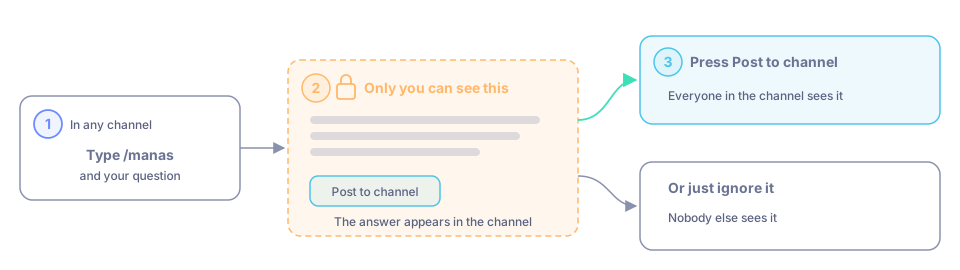
In any channel, type /manas followed by your question.
The answer appears in the channel, visible only to you.
To share it, press Post to channel. Otherwise just ignore it.
Other things /manas can do
| Type | What it does |
|---|---|
/manas help | Shows a short help message: how to ask, connect Google and Slack, scheduled chats, Morning brief and Dreaming. The Home tab shows the same. |
/manas settings | In a channel, opens this channel's Manas settings. See Set up a channel. In your DM with Manas, shows your own settings. See Settings and privacy. |
/manas access | Tells you what Manas can use in this channel. |
/manas agents | Lists your agents. |
/manas connect | Sends you the Connect Manas card. Once you're connected, shows your connections (Manas, Google, Slack as you), each with Connect, Reconnect or Disconnect. See Connect your account. |
/manas disconnect | Disconnects your account. See Settings and privacy. |
/manas schedule list | Lists your scheduled chats (and the built-in Morning brief and Dreaming), each with Pause / Resume, Change time, Test run and Delete buttons. See Scheduled chats. |
/manas schedule help | The short list of schedule commands: add, pause, resume, delete (asks first), run, test, time, file. |
Ask about a message
Hover over a message, open the ⋮ menu and choose Ask Manas about this. Manas answers about that message and its thread.
Good to know
- In your DM with Manas,
/manasreplies are ordinary messages that stay in the conversation, not private ones. - Answers to
/manasoutside your DM keep file links as links. /manasuses the same limits as other questions.