
Where you ask changes the answer
Channel, group DM, DM with Manas, /manas or App Home: who Manas answers as, whose budget it uses and who sees the answer.
Where you ask Manas decides who it answers as, whose budget it uses and who sees the answer. The rule is simple: if other people can see the answer, Manas answers as the channel. If only you can see it, Manas answers as you.
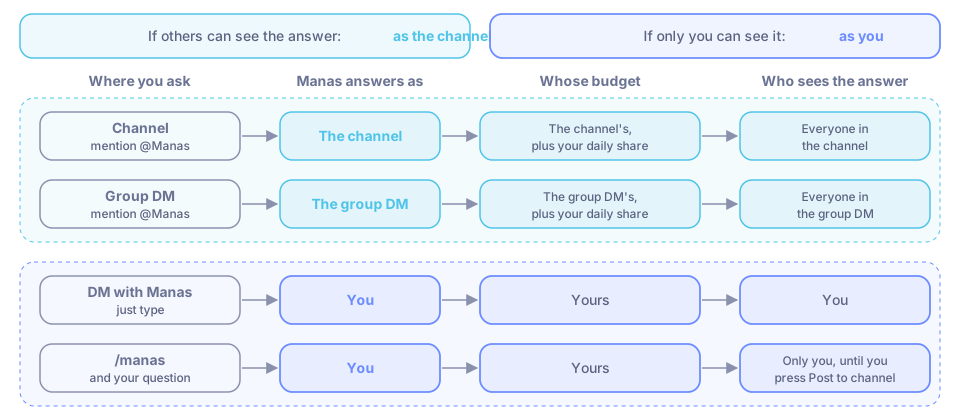
Compare
| Channel (public or private) | Group DM | DM with Manas | /manas | App Home | |
|---|---|---|---|---|---|
| How to start | Mention @Manas | Mention @Manas | Just type | /manas and your question | Click Manas in the sidebar |
| Manas answers as | The channel | The group DM | You | You | — (settings page) |
| Whose budget | The channel's, plus your daily share | The group DM's, plus your daily share | Yours | Yours | — |
| Which agents | Agents shared for Slack channels, limited to the channel's Allowed agents | Same as a channel | Agents you can use with Remote access | Same as DM; the channel's allowed list doesn't apply | Lists your agents, with Start |
| Who sees the answer | Everyone in the channel | Everyone in the group DM | You | Only you, until you press Post to channel | You |
| Reads the thread | ✓ | ✓ | ✓ | ✗ just your question | — |
| Reads other channels | Only if Slack read tools is on in the channel's settings | Same as a channel | ✓ public channels Manas is in | — | — |
| Needs setting up first | ✓ invite Manas; it sets itself up in about a minute | ✓ same | Connect Manas once | Connect Manas once | — |
| Google Drive, cloud computer | Drive links after your private Allow; no computer | Same as a channel | ✓ as you | ✓ as you | Connect or disconnect Google Drive |
| Memory | ✗ none | ✗ none | Your own Manas memory | Your own Manas memory | — |
Channel
Mention @Manas and it answers in a thread, as the channel. Replies in the thread need a new mention, unless the channel turned on following threads. See Channels.
- The channel needs at least 2 people (bots and guests don't count).
- The channel has its own budget. Each person also has a daily share of channel answers across all channels.
- Private channels work the same way; Manas must be invited.
- Channels shared with other companies (Slack Connect) don't work.
Group DM
A group DM (a direct message with several people) works exactly like a channel. Add Manas to the conversation, then mention @Manas. It sets itself up, answers as the group DM, uses that conversation's own budget and follows the same rules. A plain message without a mention is not a question.
Artifacts made in a group DM open for the people in it now, like a private channel.
DM with Manas
Every message is a question; no mention needed. Manas answers in a thread under your message, as you, with your agents and tools. The first time, press Connect Manas. See Direct messages.
/manas
Type /manas and your question anywhere. Only you see the answer, and it runs as you. Press Post to channel to share it. The answer arrives in one piece when it's done. See The /manas command.
In a DM with Manas, /manas answers like a normal DM message.
App Home
Click Manas in the Slack sidebar. Here you see whether you're connected, choose your default agent for DMs, press Start next to an agent to begin a conversation with it, open a channel's settings, connect Google Drive and find your artifacts. You don't ask questions here; that happens in the DM.
Good to know
- Type
/manas accessin any channel to see who Manas answers as there, which agents can answer and the limits. - If an answer in a channel needs your own connections, Manas asks you privately first.
If something goes wrong
- Manas didn't answer my message in a channel or group DM. Mention @Manas. Without a mention it only answers in threads it follows.
- "Manas works in channels with at least 2 people." Add a teammate, then ask again.
- More messages and what to do: Rules and limits.