
Direct messages
Ask Manas in a DM, follow up in threads and read what an answer shows.
A DM with Manas works like a private chat in the Manas web app. Manas answers as you, with your own agents, tools and memory. Ask Manas to remember or forget something and it shows you a card to confirm.
Ask in a DM
Click Manas under Apps in the Slack sidebar. You can also open Slack's agent panel or split view.
Type your question and send it. If you haven't connected yet, see Connect your account.
Manas puts 👀 on your message and shows is working… while it works. The answer appears as it is written, and 👀 becomes ✅, or ⚠️ if it couldn't answer. Press Stop if you want it to stop.
Follow-ups
Reply in the same thread to ask a follow-up. Manas remembers what was said earlier in that thread.
Start a new message (not a thread reply) for a new topic.
What an answer looks like
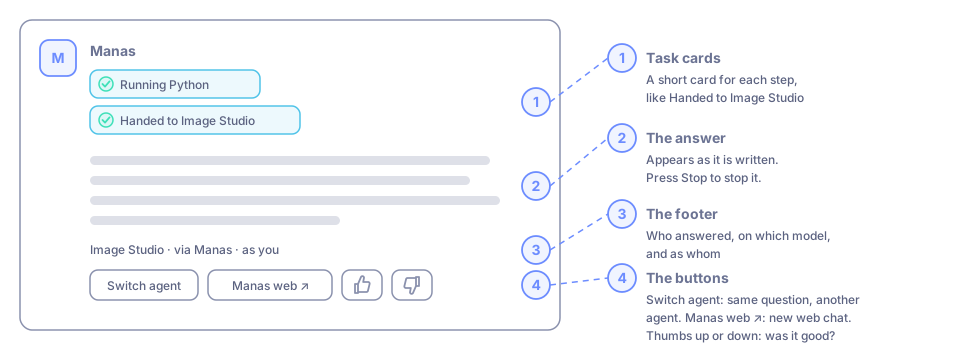
Task cards
While Manas works, it shows short cards for each step, such as Running Python, Searched your Slack or Checked your calendar. When Manas passes your request to another agent, the card says so, for example Handed to Image Studio. Repeated steps share one card with a count, like Searched your Slack ×5, and a long run shows at most six cards; the rest are counted on one +N more steps card.
Open a finished card to see what the step found and what it was given, in plain words: for example 12 messages and channel: #growth · since: 7d. Agents show by name and files by file name; Manas never shows message contents there.
The footer
Every answer ends with a small line that says who answered, on which model, and as whom. For example:
Manas · Gemini 3.8 Flash · as youImage Studio · via Manas · as youafter a hand-off
Under it are buttons:
- Switch agent: ask the same question to another agent. See Choose an agent.
- Manas web ↗: opens a new chat in the Manas web app with that agent. It doesn't carry this Slack conversation.
- 👍 / 👎: tell us if the answer was good. 👎 asks what went wrong, for example Wrong or made up or Too slow, with an optional Tell us more box. 👍 gets a private thanks, also with Tell us more. Ratings from Slack and from the web app reach the Manas team together.
Drafts and other things Manas does for you
When you ask Manas to draft an email, add a calendar event or send a Slack message as you, nothing happens until you confirm. A card shows exactly what it will do, with Confirm, Edit and Cancel. In Edit, fields the action needs (like To or an event's times) can't be left empty. The card appears in the thread where you asked (or in the DM itself if you used /manas). Once it's done, the card says so with a short link, such as Open draft in Gmail, Open event in Calendar or Open doc. With your Approvals set to Ask me only when needed, small things that only touch your own stuff (a draft, a reminder, an event with no guests) are done straight away with an Undo instead. See Approvals.
If you ask somewhere else (with /manas in a channel, a group DM or another DM), the card still comes to your DM with Manas, saying where you asked, and Manas's answer links to it. Cards never appear in a channel.
If Manas first needs you to connect Google or your Slack (or allow one more thing, like Calendar), its answer has the link and a Try again button. Open the link, connect, then press Try again to ask the same question again.
Good to know
- What you ask in a DM counts towards your normal Manas usage. See Daily allowance.
- Your DM conversations don't appear in your Manas chat history. See Manas on the web vs in Slack.
- Your default agent for new DM conversations is set on the Manas Home tab, or with
/manas settingshere in your DM, which also shows your connections (Manas, Google, Slack as you), the Morning brief and Dreaming. See Settings and privacy. /manascommands you type in your DM with Manas (/manas help,/manas connect,/manas settings…) reply with ordinary messages that stay in the conversation.
If something goes wrong
Manas says an agent "needs a tool you haven't connected in Manas". Press Connect in Manas ↗, open the agent in Manas and sign in to the tool it asks for. Then press Try again.
Manas says "You've asked 20 times in the last 10 minutes". Wait for the time it gives, then ask again.
Manas says "Agent name uses model, which isn't available in Manas". Pick another agent, or ask the agent's owner to choose another model.