
Choose an agent
Ask a specific agent with +name, Switch agent or the Ask an agent shortcut.
You don't always have to pick an agent. Ask Manas for an image or a video and it hands the request to the agent that makes it, such as Image Studio or Kala. When you know which agent you want, you can pick it yourself.
Three ways to pick
Start your message with + and the agent's name.
- In a DM:
+kala make a 20 s video about Ashwagandha Gummies - In a channel, put it right after the mention:
@Manas +kala make a 20 s video about…, or just start a new channel message with it:+kala make a 20 s video about…. Manas answers in a thread.
If more than one agent matches the name, Manas asks which one you mean.
Under an answer, press Switch agent. A small window opens: pick another agent and press Ask again. Manas asks the same question again with that agent, in the same thread, and the thread stays with that agent from then on.
Use the Ask an agent shortcut in Slack (the ⚡ shortcuts menu). Choose the agent from the list, type your question and press Ask.
How hand-offs work in a thread
A thread stays with the agent that answered last. Manas starts the thread; when it hands off, your next message goes straight to the agent it handed to.
- Image Studio, Tattva and the Computer do their own kind of work. Ask them something else and they hand it straight back to Manas, which answers or hands on in the same reply. You'll see a step Handed to Manas.
- Kala and agents your colleagues built don't hand back. They answer everything in the thread until you switch.
The task card says Handed to … and the footer shows who answered, for example Image Studio · via Manas · as you.
Manas can hand off to agents in the Agent Marketplace and to agents shared with you or your channel. For an agent only its owner uses, use +name. More in How hand-offs work.
Sticking with one agent
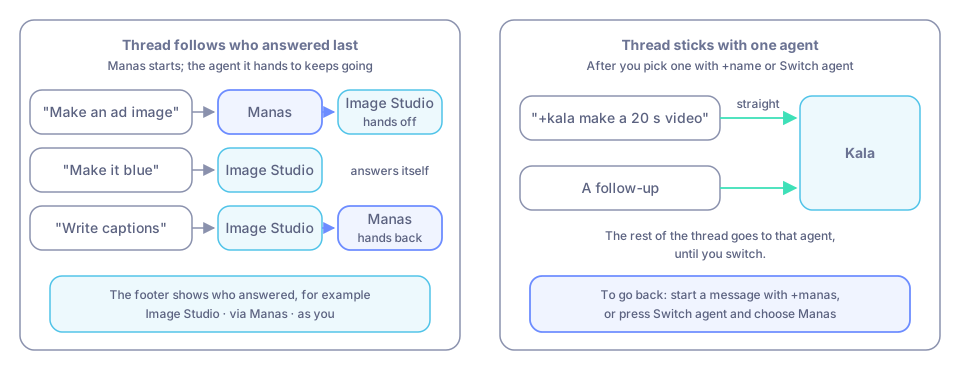
Once you pick an agent with +name or Switch agent, the rest of the thread goes to that agent.
To go back, start a message with +manas, or press Switch agent and choose Manas.
Which agents you can use
- In a DM: your own agents and the ones shared with you, if they are available in Slack. The Manas Home tab lists them under Your agents in Slack, each marked DMs and channels or your DMs only.
- In a channel: only agents enabled for Slack, and only the ones the channel allows.
- Type
/manas agentsto see your list.
Good to know
- Not sure which agent to use? Ask:
@Manas which agent makes video ads? - Built your own agent? To use it in Slack, open it in Manas, then Share → Remote access. See Share an agent.
If something goes wrong
Your agent does not show up in Slack. Its owner has to make it available: open the agent in Manas, then Share → Remote access.
The wrong agent answered. Press Switch agent and pick the right one.