
Manas in Slack
Manas in Slack
Ask Manas and Kapiva's agents from Slack, in a DM, in a channel or privately.
Manas is also an app in Kapiva's Slack (All@Kapiva). You can ask it a question, get a draft or make an image without leaving Slack.
Find it under Apps in the Slack sidebar, or send a message to @manas.
What you can do in Slack
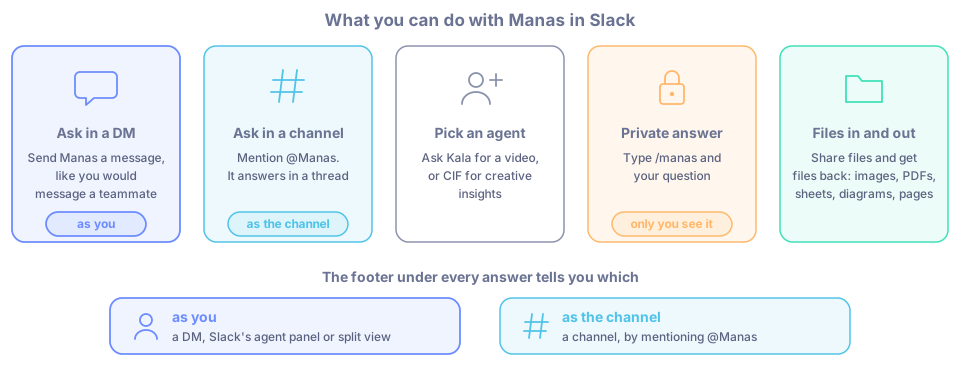
- Ask in a DM. Send Manas a message, the same way you would message a teammate. See Direct messages.
- Ask in a channel. Mention @Manas and it answers in a thread. See Channels.
- Pick an agent. Ask Kala for a video or CIF for creative insights. See Choose an agent.
- Get a private answer. Type
/manasand your question. Only you see it. See The /manas command. - Share files and get files back. Images, PDFs, sheets, diagrams and pages. See Files and artifacts.
As you, or as the channel
Manas answers in one of two ways. The footer under every answer tells you which.
| Where you ask | Manas answers… | It uses |
|---|---|---|
| A DM with Manas, Slack's agent panel or split view | as you | Your own Manas account, agents, tools and memory |
| A channel, by mentioning @Manas | as the channel | Only the agents enabled for Slack. Never anyone's private tools or memory |
In a DM, your questions count towards your normal Manas usage. Each channel has its own budget. See Usage limits.
How it relates to the Manas web app
- Your DM with Manas uses the same account you use at manas.kapiva.tech. The agents you see there are the agents you can use in your DM.
- Slack conversations do not appear in your Manas chat history yet.
- In a DM, Manas web ↗ under an answer opens a new chat in Manas with that agent.
Good to know
- How Slack differs from Manas on the web: see Manas on the web vs in Slack.
- You connect once. The first time you DM Manas it asks you to connect. See Connect your account.
- Your Slack email must match your Manas email.
- Each person can ask 20 times in 10 minutes.
- Press 👍 or 👎 under any answer. 👎 asks what went wrong, which helps the Manas team improve it.