
Set up a channel
Add Manas to a channel and choose how it works there.
Any member of a channel can add Manas and change its settings. No admin needed.
Add Manas to a channel
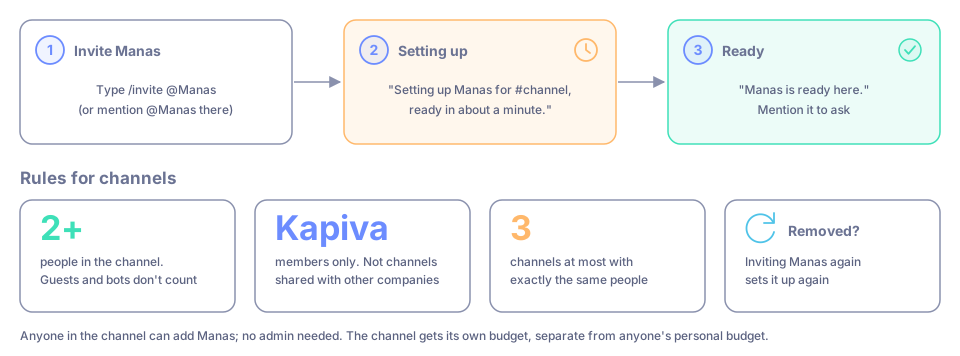
In the channel, type /invite @Manas (or mention @Manas there).
Manas replies "Setting up Manas for #channel, ready in about a minute."
A minute later it says "Manas is ready here." Mention it to ask.
The channel gets its own budget, separate from anyone's personal budget.
Rules for channels
- At least 2 people. Guests and bots don't count.
- Only Kapiva members can add Manas. It doesn't work in channels shared with other companies.
- Manas works in at most 3 channels with exactly the same people. For a 4th, use one of those, or add the teammates the new channel is for.
- If Manas is removed from a channel, inviting it again sets it up again.
Change the settings
Type /manas settings in the channel. You can also open the Manas Home tab and pick the channel under Channel settings: channels Manas is in come first, under Manas is here; for the others, invite Manas first (/invite @Manas). A window called Manas in this channel opens (Manas in this group DM in a group DM with Manas).
| Setting | What it does |
|---|---|
| Default agent | The agent that answers when nobody picks one. Empty means Manas. |
| Allowed agents | Which agents can be used here. Empty means every agent enabled for Slack. |
| Replies | Only when mentioned, or Also follow threads Manas answered. |
| Slack read tools | Off, or let agents with Slack tools read older thread replies, recent messages in public channels Manas is in, and people's profiles. Every read is logged. Off by default. |
| Channel instructions | Guidance for every answer, for example "Short bullets; amounts in INR". |
| Need a human? — user group / people | Who Manas tags when someone presses Need a human?. |
The window also shows the channel's Scheduled chats in this channel, each with a ⋯ menu: Run now, Test run, Pause or Resume, and Delete…. See Scheduled chats.
Press Save. Every change is announced in the channel, so everyone knows what changed.
Good to know
- Type
/manas accessto see a summary: agents, instructions, Need a human?, Slack read tools and limits. - Google Drive links in a channel are read only after the person who posted them allows it. Each person can choose, for one channel, to stop being asked even for files not everyone can open. See Files and artifacts.
- Limits per channel: 20 questions per person in 10 minutes, 5 files of up to 10 MB per question.
- Each person also has a daily share of the channel's answers.
If something goes wrong
"Manas works in channels with at least 2 people". Add a teammate, then ask again.
"Manas already works in 3 channels with exactly these people". It names those channels. Ask in one of them, or add the teammates this channel is for.
"I couldn't set up Manas for #channel", or "Manas has reached its limit of channels". Ask a Manas admin. Meanwhile you can DM Manas or use /manas.
You or the channel have used today's budget. It refills on its own; the message says when.