
Manas on the web vs in Slack
What works the same, what works differently and what is only in Manas on the web.
Manas in Slack runs the same agents on the same models as Manas on the web. Some things work differently, mostly because a Slack answer belongs to a Slack thread, not to your Manas chat history.
The short version
- A Slack thread is not a Manas chat. It doesn't show up in your Manas history, and you can't carry on a Slack thread in the web or a web chat in Slack.
- In a DM with Manas, it's you. Your own agents, tools and allowance.
- In a channel, it's the channel. The channel's own Manas account, its own budget, only the agents shared for Slack, and never your personal tools or memory.
Side by side
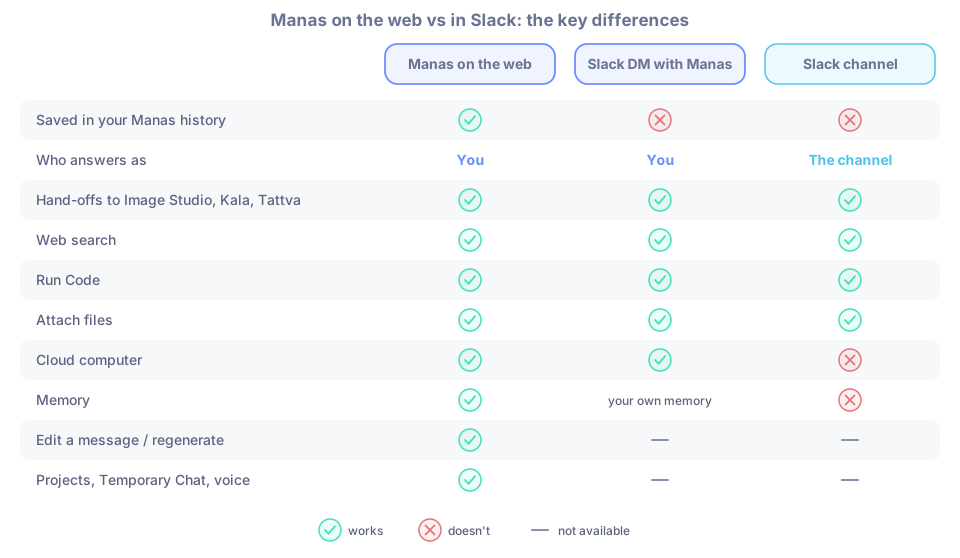
✓ works · ✗ doesn't · — not available
| Manas on the web | Slack DM with Manas | Slack channel | |
|---|---|---|---|
| Saved in your Manas history | ✓ | ✗ | ✗ |
| Who answers as | You | You | The channel |
| Whose budget | Your daily allowance | Your daily allowance | The channel's budget, plus your daily share of channel answers |
| Agents you can use | Every agent shared with you | Agents you own or that are shared with you with Remote access | Only agents shared with Manas for Slack channels, and only those the channel allows |
| Choosing a model | Model menu | No model menu. Pick an agent with +name; its label shows the model family | Same as DM |
| Hand-offs (Manas passes your request to Image Studio, Kala, Tattva…) | ✓ | ✓ | ✓ |
| Web search | ✓ | ✓ (the Manas agent) | ✓ (the Manas agent) |
| Run Code | ✓ | ✓ | ✓ |
| Google Drive | ✓ Drive tools | ✓ Drive links you paste, after Connect Google Drive | Drive links are read with your access only after you say Allow privately. The channel itself has no Drive |
| Cloud computer | ✓ | ✓ (watch it with Manas web ↗) | ✗ The channel has no computer. Manas offers to run it as you, privately |
| Tools that need your own sign-in | ✓ after you connect them | ✓ once connected in Manas on the web | Manas asks you privately: Use my Manas or No thanks |
| Attach files | ✓ | ✓ up to 5 files, 10 MB each | ✓ same |
| Images you send | ✓ | ✓ large ones are sent as a smaller picture | ✓ same |
| Files and images agents make | In the chat | Uploaded into the thread, with Save to my Drive | Same as DM |
| Artifacts (diagrams, pages, documents) | In the chat; publish to share | Published automatically as a link, diagrams as images | Same; anyone at Kapiva (public channel) or the channel's members (private channel) can open them |
| Memory | ✓ see and edit it in Memories. See Memory | ✓ your own memory; ask Manas to remember or forget and confirm the card | ✗ a channel has no memory |
| Edit a message / regenerate | ✓ | — Ask again, or Switch agent under the answer | Same as DM |
| Scheduled chats | ✓ answers land in your chat history | ✓ answers post in your DM. See Scheduled chats in Slack | ✓ answers post in the channel |
| Projects, Temporary Chat, voice | ✓ | — | — |
| Tattva | As you | As you | As the channel. Personal data is hidden and nothing is saved to the project's memory. A Tattva project admin must add the channel |
Why a Slack thread isn't in your Manas history
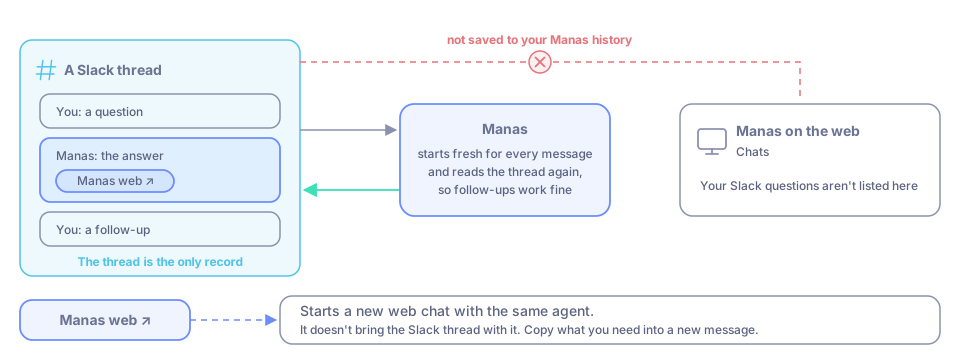
Every time you ask in Slack, Manas starts a fresh conversation and reads the Slack thread again to know what was said. The thread in Slack is the only record. In practice:
- You won't find your Slack questions under Chats on manas.kapiva.tech.
- You can't open a Slack thread in the web to keep going, or bring a web chat into Slack. Copy what you need into a new message.
- Follow-ups in the same Slack thread work fine, because Manas reads the thread each time.
- On the cloud computer, each Slack message gets its own chat folder.
The Manas web ↗ button under a DM answer opens a new web chat with the same agent. It doesn't bring the Slack thread with it.
Hand-offs in Slack
Hand-offs work a little differently in Slack. On the web, every new message goes to Manas first, and Manas decides each time whether to answer or hand off. In Slack, a thread stays with the agent that answered last. After Manas hands off to Image Studio, Tattva or the Computer, your next message goes to that agent; if it's not something that agent does, it hands straight back to Manas, which answers or hands on in the same reply. Kala and colleagues' agents don't hand back: they answer everything until you switch. The footer names the agent that answered, for example Image Studio · via Manas · as you. See How hand-offs work.
If you pick an agent yourself with +name or Switch agent, the thread stays with that agent. To bring Manas back, start a message with +manas or choose Manas under Switch agent.
Good to know
- Not sure what works in a channel? Type
/manas accessthere. - Want your own tools in a channel? Use /manas for a private answer as you.
- An agent whose model isn't offered in Manas on the web won't run in Slack either.
- While an agent works, Slack shows a card for each tool it uses, such as the cloud computer, Google Drive or Run Code, in plain words.
- Run Code versus the cloud computer, and file limits everywhere: Run Code, the cloud computer and your files.
- Images from Image Studio, Kala's frames and videos, and Tattva's charts are uploaded into the thread. Save to my Drive under them says "Saving…", then tells you how it went. See Files and artifacts.
- An artifact link opens while the answer is still coming ("Preparing page"). Find all your artifacts from the Manas App Home.
If something goes wrong
- I can't find my Slack answer in Manas. That's expected. Slack threads aren't saved to your Manas history.
- An agent I use on the web isn't in Slack. Its owner needs to share it with Remote access. See Choose an agent.
- More: Rules and limits.