
Channels
Mention @Manas in a channel to get an answer in a thread that everyone can see.
In a channel, Manas answers as the channel. Everyone in the channel sees the answer. It uses only the agents enabled for Slack, never anyone's private tools. Answers in a channel don't use memory.
Ask in a channel
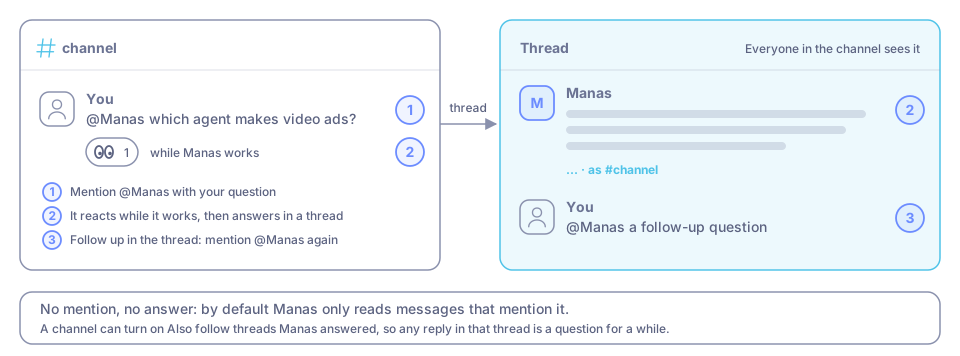
Type @Manas followed by your question, for example: @Manas which agent makes video ads?
Manas puts 👀 on your message while it works and answers in a thread under it. When it's done, 👀 becomes ✅, or ⚠️ if it couldn't answer.
To ask a follow-up, reply in the thread and mention @Manas again.
Asking a particular agent? You can skip the mention: start a new channel message with + and its name, for example +kala make a 20 s video about Ashwagandha Gummies. Manas answers in a thread under it, just as if you had written @Manas +kala …. Messages like +1 or +91… that don't name an agent are ignored.
Which channels work
Manas works in any channel it has been added to. Anyone can add it; no admin needed. See Set up a channel.
- The channel needs at least 2 people. Guests and bots don't count.
- Only Kapiva members can add Manas. It doesn't work in channels shared with other companies.
Need a human?
If the channel has set up people to tag, answers show a Need a human? button. Press it and Manas tags those people in the thread. Once per thread per hour is enough; a second press won't tag them again.
Following threads
By default Manas only reads messages that mention it. A channel can turn on Also follow threads Manas answered. Then any reply in that thread is a question too, for a while after the last answer. A reply that mentions a colleague but not Manas is left alone, since you're talking to them; start it with +name if you do want an agent to answer. To stop following, type @Manas stop following in the thread.
Catch up on a channel
Ask @Manas catch me up on the last 7 days. Manas reads the channel's messages, including thread replies, and writes the decisions, open asks and key updates, each with a link to the message. It reaches back up to 30 days. This works in every channel Manas is in, even with Slack read tools off, because it's the channel you asked in. For a recap every morning, make it a scheduled chat.
Channel budget
Each channel has its own budget, separate from yours. Each person also has a daily share of channel answers. Once yours is used up, keep going in a DM with Manas, on your own budget.
When 90% of a day's budget is used, the next answer says so once, with when it refills.
Good to know
- Type
/manas accessin a channel to see what Manas can use there. - Want to check an answer before the channel sees it? Use /manas.
- If a channel answer needs your own connections (for example a tool only you have), Manas asks you privately: Use my Manas or No thanks. If you agree, it runs as you and only you see the answer until you press Post to thread.
- Group DMs work like channels, and each place has its own rules. See Where you ask and Rules and limits.
If something goes wrong
"You've used your share of channel answers today". DM Manas to keep going on your own budget. Your share frees up over the next 24 hours.
"Agent name isn't allowed in #channel". Pick one of the allowed agents it lists, or add the agent in /manas settings.
"I'm still being set up". Setup takes about a minute. Ask again shortly.