
Live artifacts
Publish an artifact as a page on manas.kapiva.tech, share it with colleagues, update it, and let it remember things or use Manas AI.
A live artifact is an artifact published as its own page on manas.kapiva.tech/artifacts/. It has a link you can open in any browser, share with colleagues and update later. A page can also do things: remember what people enter, and, if you allow it, use Manas AI as you.
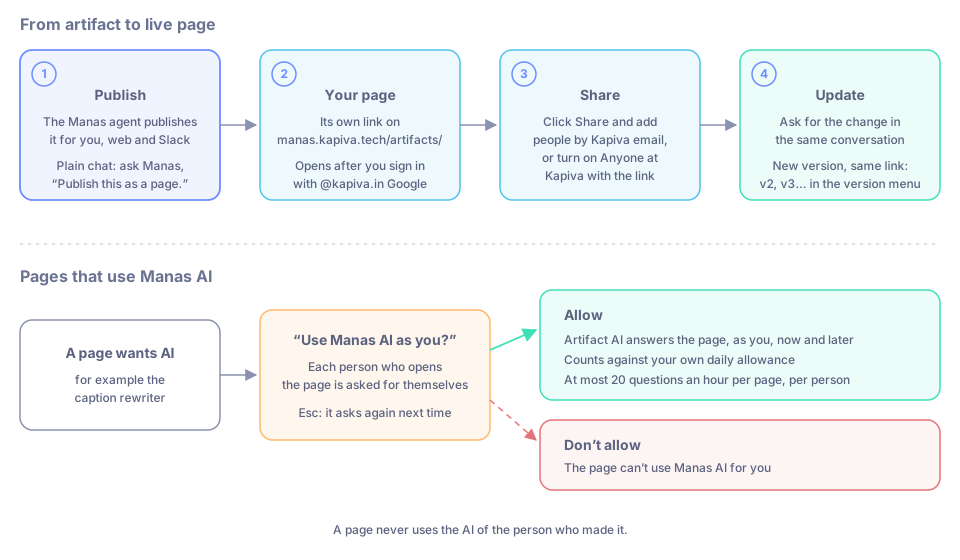
Publish, share and update a page, and how a page asks before it uses Manas AI as you.
What you can make
- A quiz. "Make a 10-question quiz on our Ayurveda basics training, with a score at the end."
- A caption rewriter. "Make a page where I paste a caption and get three shorter versions."
- A planner. "Make a weekly content planner my team can fill in and tick off."
- Also a team checklist everyone can tick, a poll, a small dashboard, a slide-style walkthrough, a diagram, or a long document such as a report or plan (documents get Save as Google Doc).
The quiz and the planner work on their own. The caption rewriter uses Manas AI, so each person who uses it is asked first (see Pages that use Manas AI).
Publish an artifact
When you chat with the Manas, Tattva or Computer agent, you don't have to ask: every artifact is published for you.
Ask for the page, for example "Make a small dashboard of these numbers".
The answer shows the artifact and ends with its link, such as Sales snapshot: https://manas.kapiva.tech/artifacts/…. The link opens only for you until you share it.
Open the link and sign in with your @kapiva.in Google account.
In a plain chat with a model, open the MCP menu under the message box, switch on Artifacts, and ask "Publish this as a page."
In Slack you don't have to ask. When Manas writes a page or an interactive chart in an answer, it publishes it for you:
- The answer shows a line such as 🧩 Sales snapshot · web page · Open live preview, and the link works straight away.
- After the answer, a card appears in the thread with the title, Open live preview and a ⋯ menu.
Diagrams and SVG pictures are published too, and also arrive in the thread as a picture. See Files and artifacts in Slack.
If the page is still being saved when you open it, it says Preparing… and refreshes on its own.
On the page
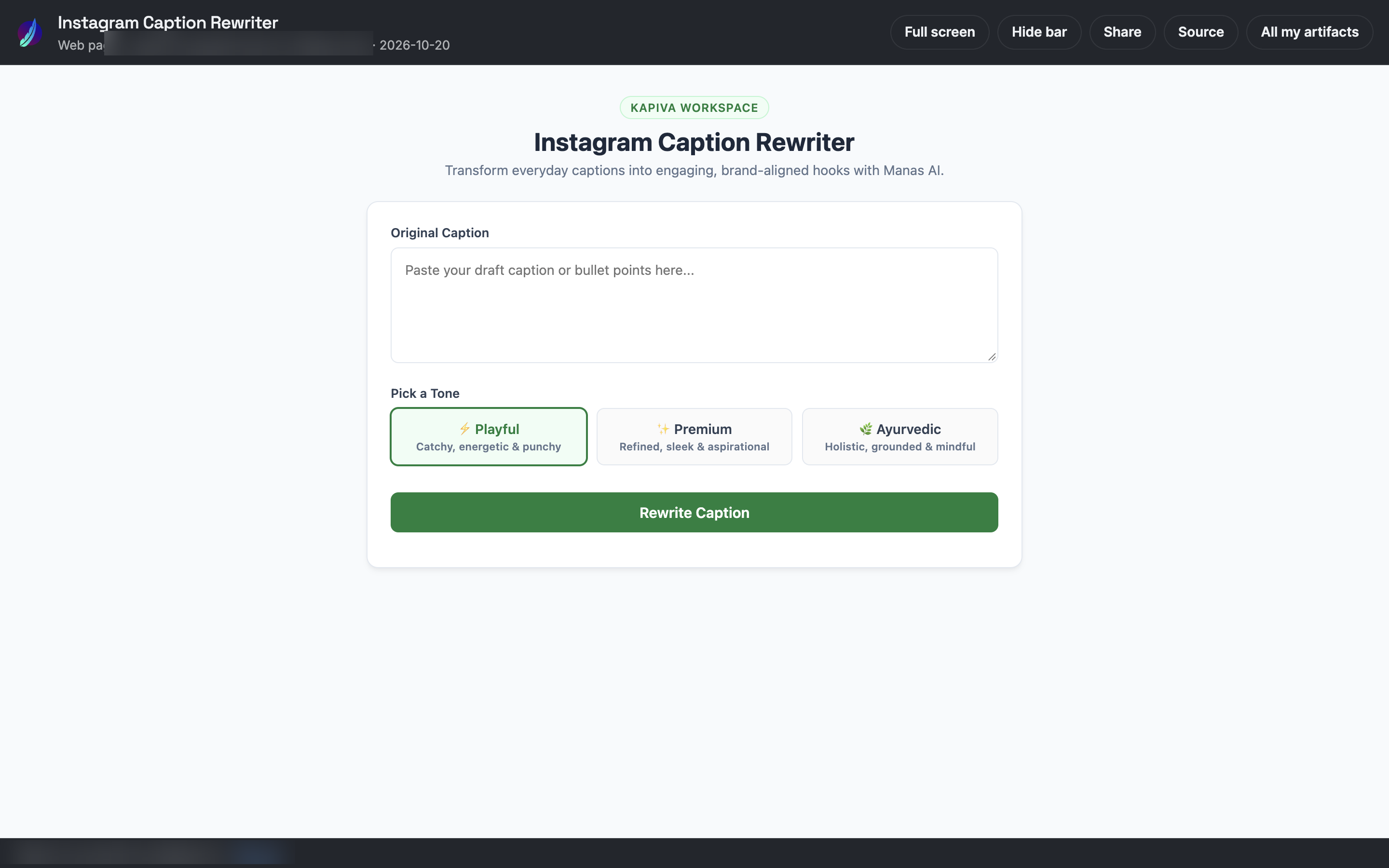
A published page, with its top bar.
The bar at the top shows the title, what kind of artifact it is, who it was made for and where, and the date. Its buttons:
| Button | What it does |
|---|---|
| Full screen | Shows only the artifact, filling the screen. You can also press F. Esc leaves. A slide deck takes the arrow keys straight away. |
| Hide bar | Tucks the bar away behind a small Show bar button. The page remembers your choice. |
| Share | Only for the person who made it. Choose who can open it. See Share it. |
| Open in Slack | Opens the Slack thread it came from. Only shown to people who can see that thread. |
| Save as Google Doc | Only on documents. Saves a copy in your own Google Drive. |
| Source | Downloads the code behind the page. |
| All my artifacts | Opens your list at manas.kapiva.tech/artifacts/, with a search by title. |
Once a page has more than one version, a version menu appears in the bar too.
The footer shows which account you're signed in with, Sign out, and what you allowed this page to do.
Who can open it
Every page opens only after you sign in with your @kapiva.in Google account. Then:
| Where it was made | Who can open it |
|---|---|
| A web chat | Only you, until you share it |
| Your DM with Manas in Slack | Only you, until you share it |
| A private Slack channel or group DM | The people in it now. Someone who leaves loses access. |
| A public Slack channel | Anyone at Kapiva |
Also, always: the person it was made for, people it's shared with, and anyone at Kapiva when Anyone at Kapiva with the link is on. Once a page is removed, nobody can open it, its maker included.
Share it
Only the person a page was made for can change who it's shared with.
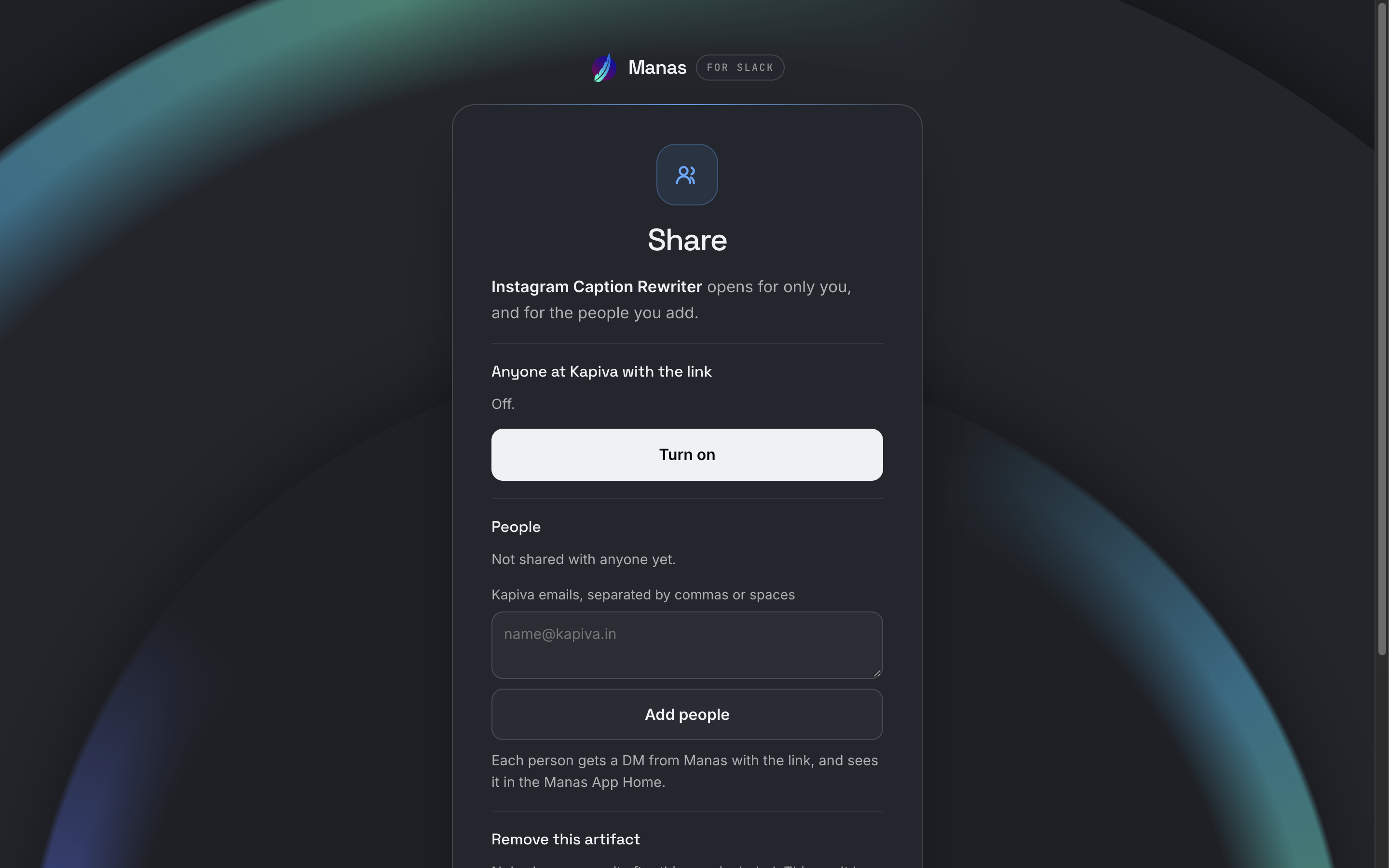
The Share page: turn on a link for anyone at Kapiva, or add people by email.
- On the page: click Share. Add people by their Kapiva email, remove them one by one, or turn on Anyone at Kapiva with the link.
- In Slack: on the card, press ⋯ → Share…. Add people, or tick Anyone at Kapiva with the link. People you add get a DM from Manas with the link.
Update it
Ask for the change in the same conversation: "Add a total row", "Make the buttons green". The new version goes to the same link.
- In Slack, the card in the thread updates in place and shows v2, v3…, and a note says the page has a new version.
- In a web chat with the Manas, Tattva or Computer agent, the answer ends with the same link, now showing the new version. In a plain chat, ask Manas to publish again after the change.
- Older versions stay on the page: pick one from the version menu in the bar. On an older version the bar says so, for example v2 (latest: v3). The link on its own always opens the newest version.
- What the page saved (notes, votes, ticks) and what you allowed it to do carry over to every version.
- Only the person the page was made for updates it this way. If a colleague asks in the same Slack thread, they get a new page of their own.
Pages that remember
A page can keep data between visits:
- Your own data, which only you see. For example your answers in a quiz or your own planner.
- Shared data, which everyone who can open the page sees and can change. For example votes, comments or a team checklist.
A page made in your DM is only yours, so its shared data is only yours too. A page made in a channel shares its data with everyone who can open it.
Before a page saves or deletes shared data for the first time, it asks you: "Save data everyone here can see?" with Allow / Don't allow. Reading shared data and saving your own data don't ask.
Need more than one page? Computer can build a whole web app with its own link: see Build a web app with Computer.
Pages that use Manas AI
Some pages ask Manas AI for something when you use them, such as the caption rewriter. Those questions are answered by Artifact AI, as you.
The first time a page wants to do this, it asks you first:
Use Manas AI as you?
This page wants to ask Manas AI as you (your email). It counts against your Manas budget. What it sends and gets back can show on this page, and the page can save it where others who open it can see it.
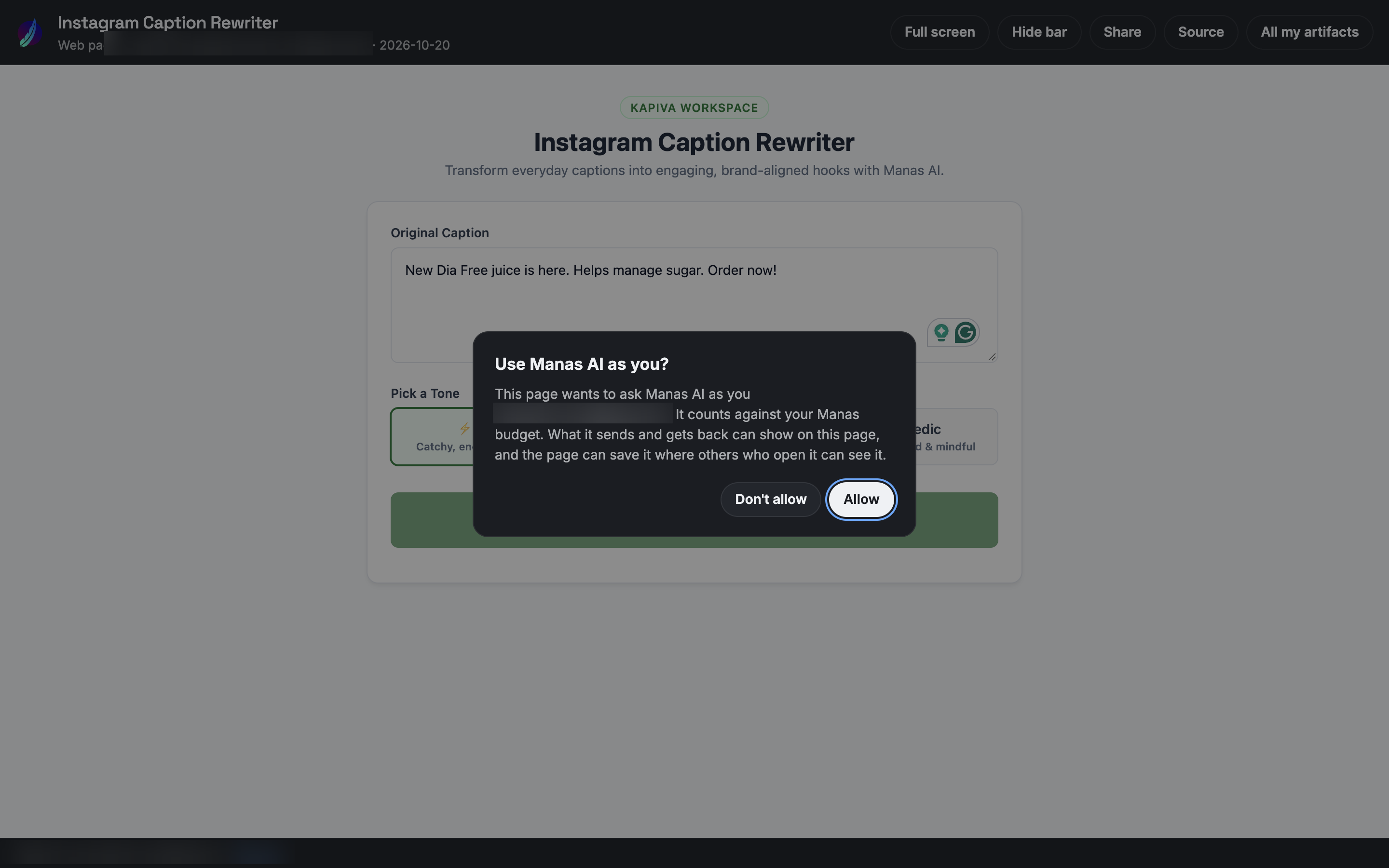
The page asks before it uses Manas AI as you.
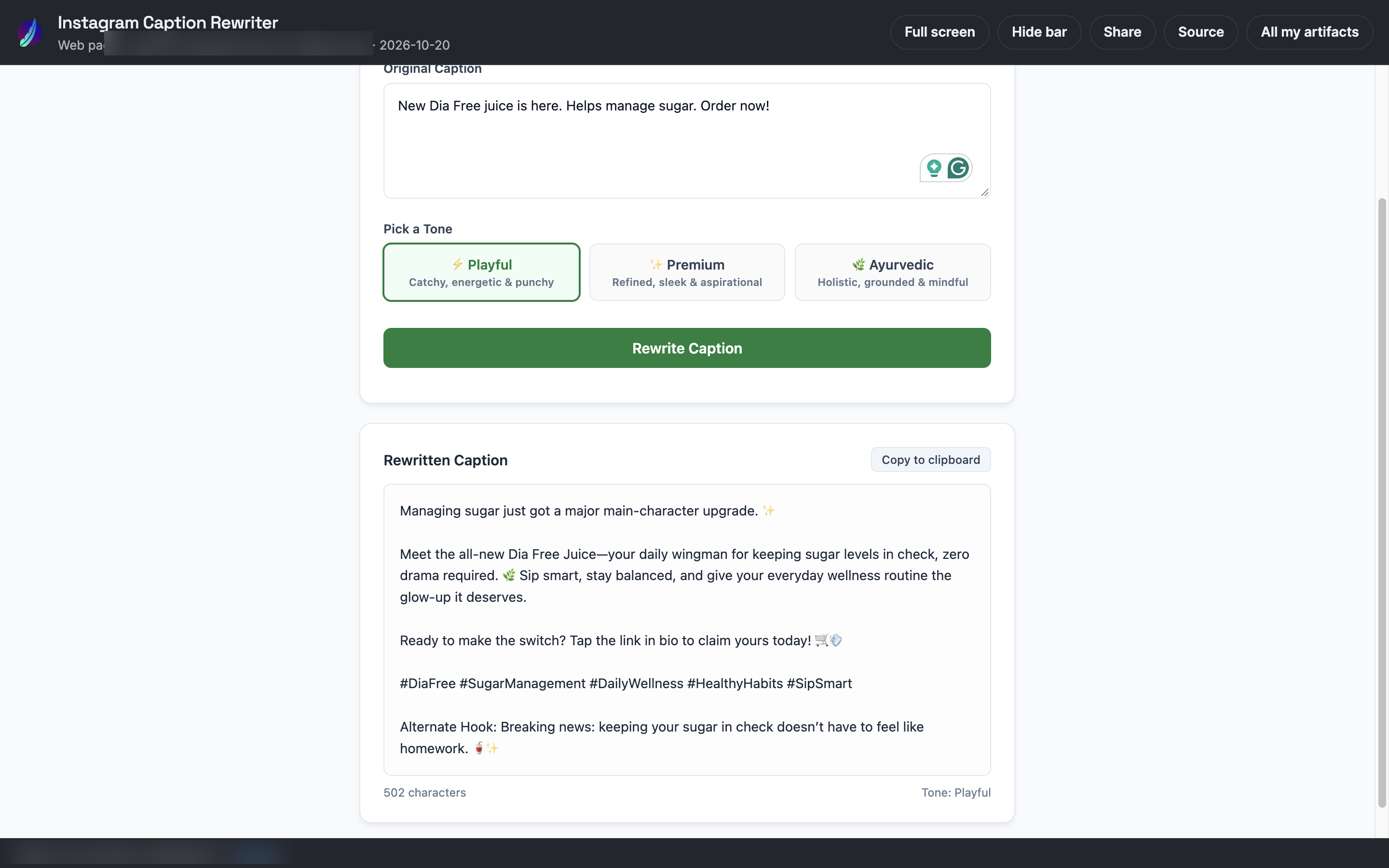
After you press Allow, the page gets its answer from Manas AI, here a rewritten caption.
- Allow lets the page use Manas AI for you, now and on later visits.
- Don't allow blocks it. The page shows "You chose not to let this page use Manas AI."
- Pressing Esc decides nothing; the page asks again next time.
Each person who opens the page is asked for themselves. A page never uses the AI of the person who made it.
What Artifact AI can and can't do
Artifact AI is a fast Gemini model that only answers the page:
- It does what the page asks and returns just the result: a rewrite, a summary, a list, a score, some JSON.
- It has no tools. It can't search the web, read your files or Google Drive, make images or reach your data. It only knows what the page sends it.
- It doesn't invent facts about Kapiva or its products beyond what the page gives it.
- You can't chat with it, and Manas never hands off to it. See Built-in agents.
Limits
- To use AI on a page, you need to have connected Manas in Slack.
- It uses your daily allowance. When that is used up, the page can't ask until it refills.
- At most 20 questions an hour per page, for each person.
- Each answer is text only and can take up to two minutes.
Pages that read Google Drive
A page can also read files from your Google Drive, read-only, if you allow that separately. It asks "Let this page read your Google Drive?" with Allow / Don't allow. You need Google Drive connected in Slack.
Only allow pages you trust. What a page reads can show on it and be saved where others who open it can see it.
Change what you allowed
The page's footer shows what you said, for example This page: Manas AI allowed, Google Drive not allowed, Saving shared data allowed. Click Reset to forget all your answers; the page asks again the next time it needs them.
Remove it
Only the person a page was made for can remove it:
- On the page: Share → Remove artifact, and confirm.
- In Slack: on the card, ⋯ → Remove…. The card then shows the title crossed out.
Removing is for good: the link stops working for everyone, you included, the page leaves everyone's lists, and everything it saved (your own and shared data) is deleted.
Find your pages
- All my artifacts on any page, or manas.kapiva.tech/artifacts/, lists the pages you can open: yours, the ones shared with you and the ones from your channels, 25 at a time with ← Newer / Older →. Search by title.
- In Slack, the Manas Home tab lists your newest under Artifacts, with See all and Open in browser.
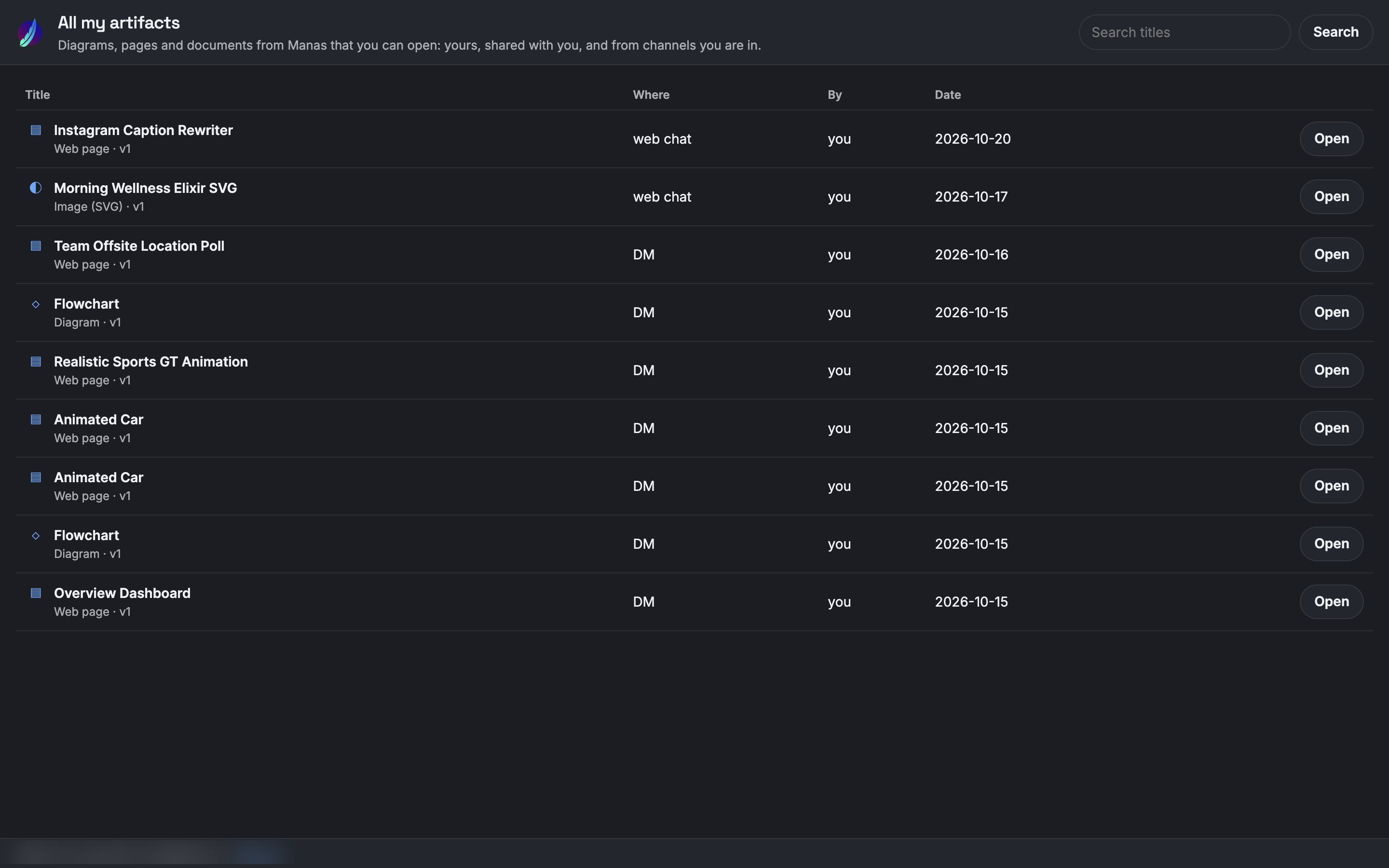
All my artifacts lists every page you can open, with a title search.
Good to know
- A page can't reach the internet. Give Manas the data in the chat, or let the page read a Drive file.
- From a web chat, a page can be up to 900 KB. In a Slack answer each artifact can be up to 512 KB, and up to 5 per answer; anything bigger stays as code.
- A page's data is limited: 64 KB per item, 1 MB for your own data and for the shared data, and 5 MB and 5,000 items for the whole page, everyone's together.
- The page follows your device's light or dark setting.
- Older links that start with manas.kapiva.tech/slack/a/ still work: they take you to the same page under /artifacts/. You may need to sign in once more.