
Usage limits
Every limit in Manas in one place, from file sizes to Kala videos, the cloud computer and Slack.
Manas has a few limits so it stays fast and fair for everyone at Kapiva. The main one is your daily allowance of credits, explained in Your daily allowance. This page lists the other limits, feature by feature.
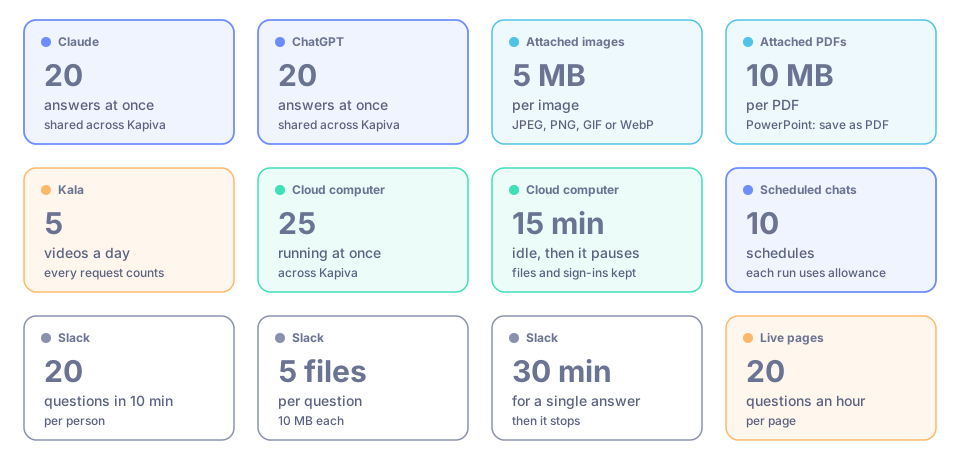
The main limits at a glance. Details for each are below.
Your allowance at a glance
- One allowance covers everything you do in Manas: every model, agents and chat titles, and your Slack DMs.
- See what's left in the account menu: click your avatar (Account Settings) at the bottom of the left menu and read Balance.
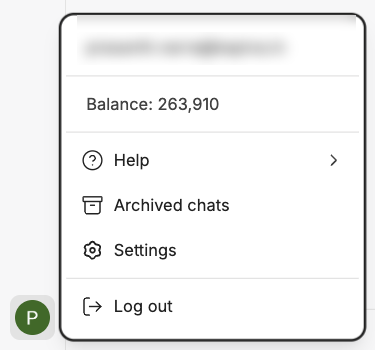
Your balance, in credits, in the account menu.
Shared model capacity
Claude and ChatGPT each run on one Kapiva account that everyone shares.
| Limit | What happens |
|---|---|
| Claude: 20 answers at once across Kapiva | When all 20 are in use, your message waits up to 15 seconds for a free one. If none frees up, you get a "busy" message. Wait about 20 seconds or switch model. |
| ChatGPT: 20 answers at once across Kapiva | The same: a short wait, then the "busy" message. Image making and the cloud computer share these 20. |
| ChatGPT weekly limit, shared by everyone | ChatGPT answers with a "usage limit" message until the week resets. Use Claude or Gemini meanwhile. |
| Gemini | No limit on answers at once. |
See Choose a model.
Images
- ChatGPT Images works only in ChatGPT chats. Each image takes 20 to 70 seconds.
- Each image uses some of your allowance: about 165,000 credits for a wide or tall image and about 211,000 for a square one.
- The shared ChatGPT account also has an image limit. When it's reached, you see "The ChatGPT seat has reached its image generation limit. It resets…" with a time.
See Images.
Files you attach in Manas
| File | Limit |
|---|---|
| Images (JPEG, PNG, GIF or WebP) | Up to 5 MB each |
| PDFs | Up to 10 MB |
| PowerPoint | Not supported. Save it as a PDF first. |
| All files in one chat | They're sent again with every message, so a chat with many large files can hit a size limit. Start a new chat for a new document. |
See Attach files.
Kala videos
Limits per person:
| Step | Limit |
|---|---|
| Frame sets | 20 an hour |
| Frame edits | 40 an hour |
| Videos | 5 a day |
Every request counts, even one that fails. See Kala.
Tattva
Most answers take one to four minutes. After about 4½ minutes Manas stops waiting and can fetch the answer later. Chart image links expire after 7 days. See Tattva.
Cloud computer
| Limit | Detail |
|---|---|
| Computers running at once | At most 25 across Kapiva. If all are in use you wait in line and the live view shows your place, for example In queue · #2. |
| Pauses when idle | After 15 minutes with no agent work and nothing typed or clicked by you. Files, sign-ins and tabs are kept. |
| Tabs | Up to 4 per chat, 10 on the computer |
| Files a website downloads | Files over 1 GB are not saved |
| Download link (Copy link) | Works for 5 minutes |
| ⤢ Open full page link | Works once, within 2 minutes, only for you |
See Cloud computer troubleshooting, and for file limits across the web, Run Code, the cloud computer and Slack, Run Code, the cloud computer and your files.
Scheduled chats
You can have up to 10 schedules. The panel shows how many you've used, for example "0 of 10 schedules used". Each run uses your allowance. See Scheduled chats.
Slack
| Limit | Detail |
|---|---|
| Questions | 20 in 10 minutes per person |
| Files attached to a question | Up to 5 files, 10 MB each |
| Google Drive links in a question | Up to 5 files, 10 MB each |
| Save to my Drive | Files up to 100 MB |
| A single answer | Stops after 30 minutes |
| Channel budget | Each channel has its own budget, separate from yours |
| Your share of channel answers | Each person has a daily share of answers in channels. When it's used up, DM Manas to keep going on your own allowance. |
| Channels | A channel needs at least 2 people (guests and bots don't count). Manas works in at most 3 channels with exactly the same people. |
When 90% of a day's budget is used, the next answer says so once at the bottom, with when it refills. See Slack settings and privacy.
Live pages (artifacts)
A live page that uses Manas AI runs as you and counts against your allowance, at most 20 questions an hour per page. See Live artifacts.
Good to know
- Long, careful answers and long chats use much more allowance than quick questions. A lighter model, or a new chat, goes further.
- Don't retry paid steps "just in case". Each Kala video and each image counts, even if it fails.
If something goes wrong
- "Insufficient funds. Balance: … Prompt tokens: … Cost: …" You've used your allowance. Once a day has passed since your last top-up, send the message again. See Your daily allowance.
- "Claude is busy right now (all 20 slots are in use)…" Wait about 20 seconds and send again, or pick another model.
- "You've asked 20 times in the last 10 minutes" (Slack). Wait for the time it gives.
- "You've used your share of channel answers today" (Slack). DM Manas to keep going on your own allowance.
- Kala says
RATE_LIMITED. Wait for the time it gives, or ask the Manas admin if you really need more.
For more, see Troubleshooting.