
Data & privacy
Who can sign in, where your chats and files are kept, which AI companies see your messages, and what you can switch off or delete.
This page explains, in plain terms, what happens to what you type and attach in Manas.
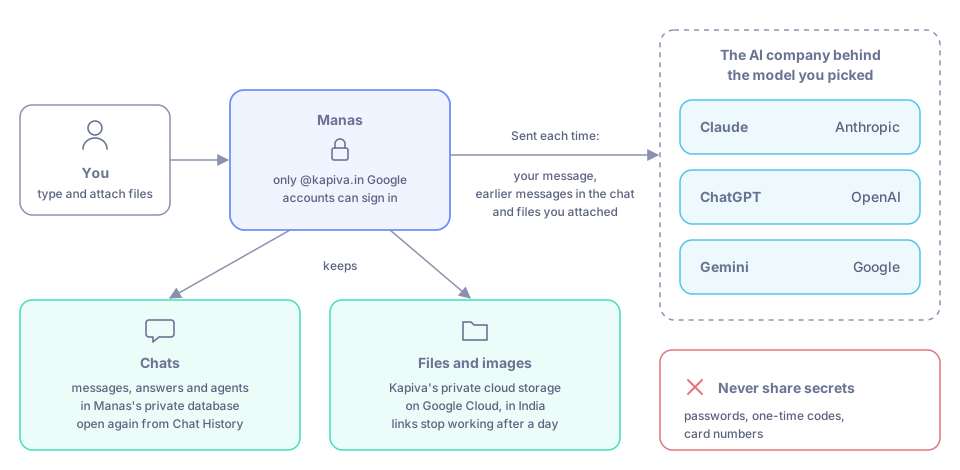
Where your words and files go, and where they are kept.
Who can sign in
- Only people with a @kapiva.in Google account. Other Google accounts are refused.
- You sign in with the Google button. Manas has no separate password, and email-and-password sign-in is switched off.
- Your Manas account is created the first time you sign in.
Where your chats and files are kept
- Chats (your messages, the answers and your agents) are kept in Manas's own private database, so you can open them again from Chat History.
- Files you attach, and images Manas makes, are kept in Kapiva's own private cloud storage on Google Cloud, in India. They are never on a public website. Links to a file are signed and stop working after a day; Manas renews them for you when you open the chat.
- Deleting a file in Manas also deletes it from storage.
Which AI companies see your messages
When you send a message, Manas sends it to the AI company behind the model you picked, together with the earlier messages in that chat and any files you attached. That is how the model can answer.
| Model you pick | Company | How Kapiva uses it |
|---|---|---|
| Claude | Anthropic | Through Kapiva's company Claude account |
| ChatGPT (and ChatGPT Images) | OpenAI | Through Kapiva's company ChatGPT account |
| Gemini | Through Kapiva's Google account for Gemini |
A few things also use a model in the background:
- Chat titles are written by a model when you start a chat.
- Agents use the model their owner chose. The Manas, Tattva and Artifact AI agents use Gemini; Image Studio uses ChatGPT.
Don't paste secrets
Never share passwords, one-time codes, card numbers or other secrets in a chat.
Other services that see parts of a request
- Web search runs on Kapiva's own search service. It sends your search words to Google and Bing and reads the pages it finds. It can't reach Kapiva's internal sites. See Web search.
- Run Code runs on a Kapiva server with no internet, so the programs it writes can't send your data anywhere. See Run code.
- Kala sends your script and frames to paid image and video services to make the video. See Kala.
- CIF searches public sources (Amazon, Reddit, Google, Meta ads). See CIF.
- Tattva answers from Kapiva's business data in the projects you belong to, with its own rules for personal data. See Tattva.
Memory
Memory holds what you want Manas to keep in mind about you across chats: your preferences, your work, your skills and interests, and useful context. Nothing is added on its own: only Manas changes it, when you ask and confirm the card, and you can change it yourself. The agent you chat with uses it in Manas web and in your Slack DMs; channels have no memory.
- See, add, change or delete your memories in Memories in the left menu.
- Turn memory off for yourself in Settings.
See Memory.
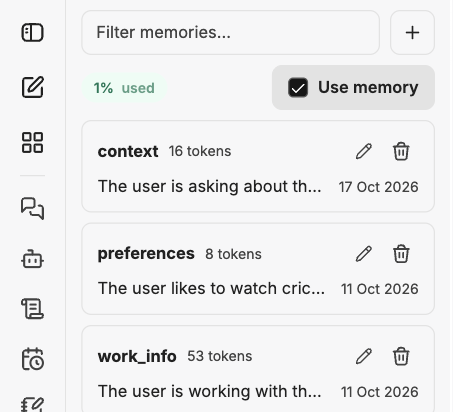
Memories shows what is saved about you. You can change or remove any of it.
Your cloud computer
Your cloud computer is yours alone. Nobody else, and no other person's agent, can see its screen, its files or the sites you are signed in to.
- The agent never types passwords, one-time codes or card numbers. You sign in yourself with Take control.
- It reaches the public internet only, not Kapiva's internal systems.
- Your Google Drive access is kept encrypted by Manas and never goes onto the computer. Disconnect removes it.
See Privacy and pausing.
Google Drive, Gmail and Calendar
Manas only uses your Google account after you connect it, and only with your own access: it can open what you can open. One connection covers all three.
- Google Drive: it finds, reads and creates files; it never edits, shares or deletes your files. See Google Drive.
- Gmail and Google Calendar: read-only. It can't send, reply to or delete mail, or create, change or answer events. See Gmail and Google Calendar.
- Only in the web app and your Slack DM with Manas. In a Slack channel answer Manas can't search your Drive or read your mail or calendar; it reads a Drive link pasted in a channel only after you allow it (see Slack below).
- What Manas reads goes to the model you are chatting with, so it can answer. Your Google access itself is kept encrypted and never shown to the model.
- Text in an email or file is treated as information, not instructions. Manas won't follow "forward this" or "open this link" written inside one.
- Manas records that a tool was used, never what your mail, events or files say.
- You can disconnect at any time. Disconnecting removes Drive, Gmail and Calendar together.
Slack
- Manas links your Slack account to the Manas account with the same email. You press Connect once; the link you get works for 10 minutes and only once.
- In a DM or with
/manas, Manas answers as you, with your own agents, tools and memory. - In a channel, Manas answers as the channel. It uses only agents enabled for Slack, and never anyone's private tools or memory.
- Google Drive links in a channel: Manas asks you privately first, because everyone in the channel will see the answer.
See Slack settings and privacy.
Good to know
- Each answer can use some of your daily allowance, including background work like titles.
- Want to know who can see a chat, an agent or an artifact? See Who sees what.
If something goes wrong
- Your Google account is refused. Sign in with your @kapiva.in account.
- "Email login is not allowed." Use the Google button.
- You shared something sensitive by mistake. Delete the chat or the file, and tell the Manas team.