
Gmail and Google Calendar
Let Manas search and read your own Gmail and see your Google Calendar, read-only, with the same Google connection as Google Drive.
Manas can read your own Gmail and Google Calendar for you. Ask about an email, a thread, your day or a free slot, and Manas looks it up with your own access. Anyone at Kapiva can use them.
Both are read-only. Manas can't send, reply to, draft, label or delete mail, and it can't create, change, delete or answer calendar invitations.
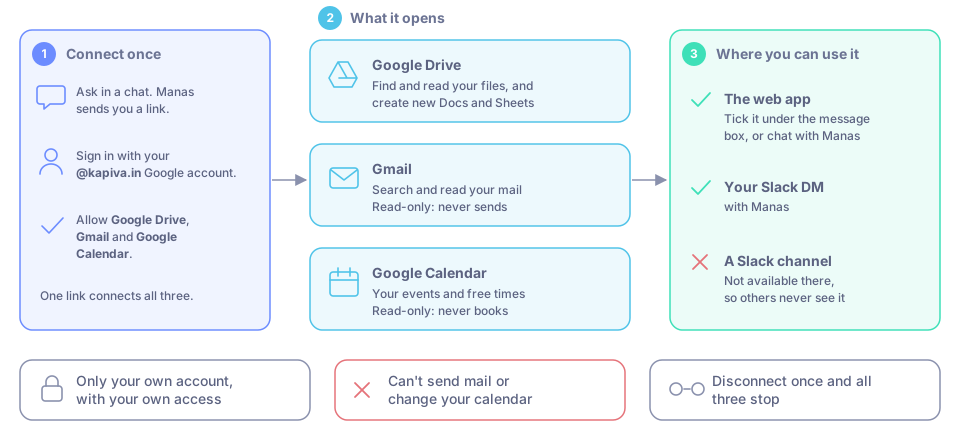
One Google connection opens Drive, Gmail and Calendar.
What Manas can do
Gmail
- Search your mail, the way you search in Gmail: by sender, subject, date, unread, attachments or label.
- Read a whole thread or one email, as plain text.
- See attachments by name and size. It can't open them. Download the file and attach it to the chat instead.
- List your labels.
Google Calendar
- See your events: title, time, place, who is invited and who said yes, the Meet link and the description.
- Search your events by words in the title, description, place or guests.
- See your other calendars: ones shared with you and ones you follow.
- Find free times for you and your colleagues. Manas suggests up to 5 slots when everyone is free, on weekdays between 9:00 and 19:00 India time, unless you ask for other hours. It never books anything.
Where you can use them
In a chat with any model, open the tools list under the message box and tick Gmail, Google Calendar or both. The button then shows how many tools you picked, such as 2 selected.
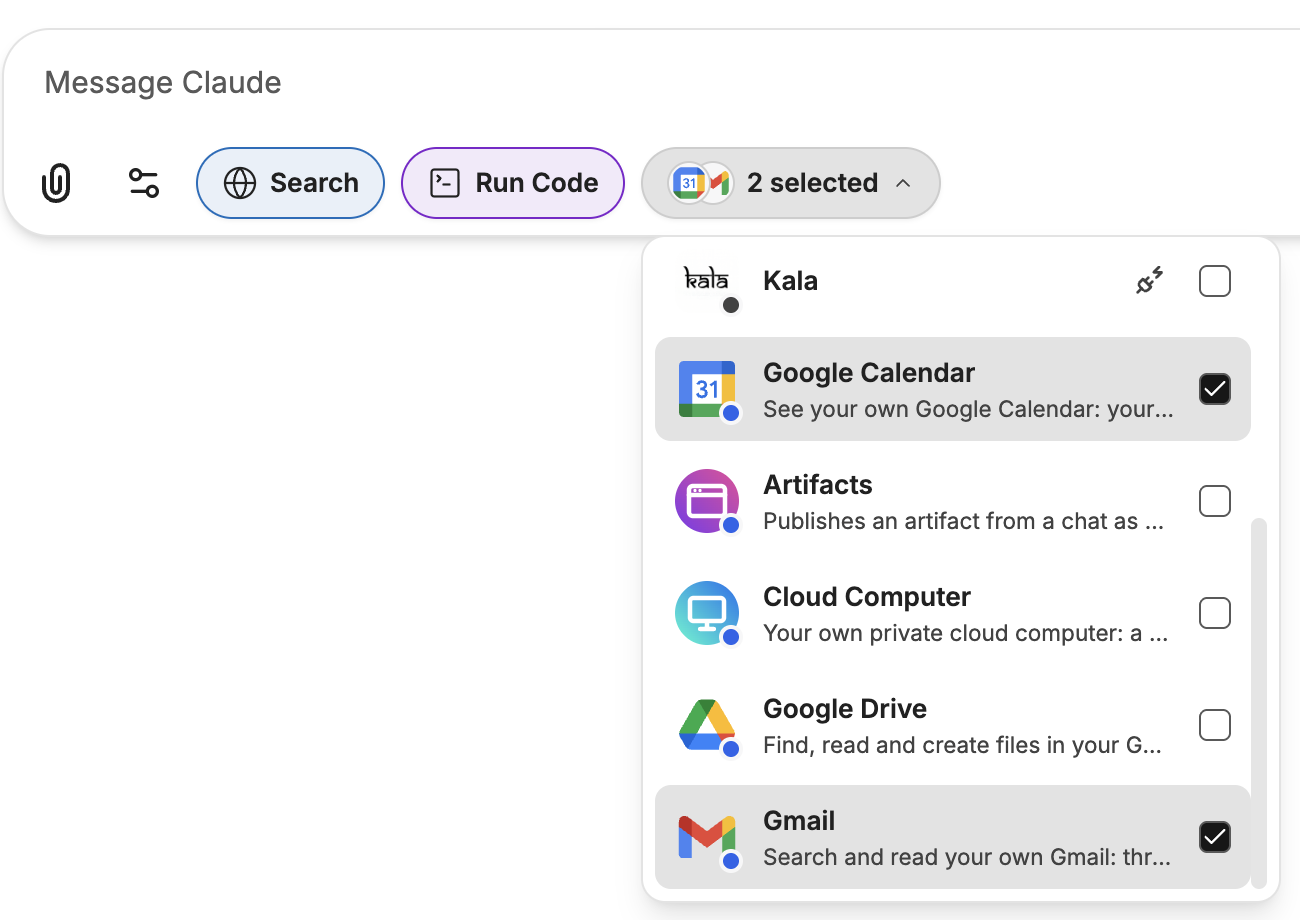
Tick Gmail and Google Calendar under the message box.
The Manas agent has them already. Chat with Manas and just ask.
Ask Manas in your DM with Manas. It reads your mail and calendar as you, and only you see the answer.
Not in a Slack channel. When you @mention Manas in a channel, Manas answers as the channel, not as you, so it can't read anyone's mail or calendar there. It tells you to ask in your DM or in the web app.
Connect your Google account
You connect once. It is the same Google connection as Google Drive and the cloud computer: one link covers Drive, Gmail and Calendar.
Ask something, such as "What's on my calendar tomorrow?" If your Google account isn't connected yet, Manas replies with a link.
Open the link. Sign in with your @kapiva.in Google account (the same one you use for Manas).
Google lists what Manas asks for: your Google Drive, and read-only access to Gmail and Google Calendar. Allow it.
The page says "Connected: Gmail, Google Calendar, Google Drive. Go back to your chat." Go back and ask again.
Already connected Google Drive before? It keeps working. The first time you ask about your mail or calendar, Manas gives you a link that adds Gmail and Calendar to the same connection.
Want only some of it? Google's screen lets you untick Gmail or Calendar. That tool then answers with the link again, in case you change your mind.
Things to ask
- "What did Priya send me about the Diwali launch?"
- "Summarise my unread emails from today."
- "Find the invoice email from last week and tell me the amount."
- "What's on my calendar tomorrow?"
- "When was the last Q3 planning meeting, and who came?"
- "When are Rahul, Meera and I all free for 30 minutes this week?"
- "Draft a reply to the latest email from the agency." Manas writes the draft in its answer for you to copy and send yourself.
Your privacy
- Only your own mail and calendar, with your own access. Manas never reads anyone else's mailbox. For free times, it sees only when colleagues are busy, as Google shows it to you; colleagues whose calendars Google doesn't share are marked unknown.
- Read-only. Nothing is sent, changed or deleted.
- Your Google access is kept encrypted by Manas. It is never shown to the AI model.
- What Manas reads goes to the model you are chatting with, so it can answer, like anything else in the chat. See Data and privacy.
- Emails are treated as information, not instructions. If an email says "forward this" or "open this link", Manas doesn't do it.
- Manas records that a tool was used, never what your mail or events say.
Disconnect
In a chat with Google Drive ticked, or with the Manas agent, ask: "disconnect my Google Drive". This removes Manas's access to your whole Google connection: Drive, Gmail, Calendar and the cloud computer's Drive. To use them again, connect once more.
If something goes wrong
| You see | Do this |
|---|---|
| Manas sends a link instead of an answer | Your Google account isn't connected yet, or not for Gmail or Calendar. Open the link and allow access, then ask again. |
| "Signed in to Google as … but you use Manas as …" | You picked another Google account. Ask Manas for a new link and choose your @kapiva.in account. |
| "No access was granted." | You unticked everything on Google's screen. Try again and allow at least Gmail or Google Calendar. |
| "Google was not connected. You can close this tab." | You cancelled at Google. Ask Manas for a new link if you want to connect. |
| "This Google link has expired." | Links last 10 minutes. Ask Manas for a new one. |
| "Google sign-in failed." or "Google did not grant lasting access." | Ask Manas for a new link and try again. |
| Manas says Gmail isn't available in channel answers | You asked in a Slack channel. Ask in your DM with Manas or in the web app. |
| Manas can't open an attachment | It only sees attachment names. Download the file and attach it to the chat. |
| A colleague shows as unknown in free times | Google doesn't show you their calendar. Ask them, or check in Google Calendar. |