
Keyboard shortcuts
Keys that start a chat, open the model menu, stop an answer and more in Manas on the web.
Manas on the web has keyboard shortcuts for the things you do most. On a Mac use ⌘ (Command); on Windows and Linux use Ctrl.
See every shortcut
Press ⌘ ⇧ / on a Mac, or Ctrl+Shift+/ on Windows. The Keyboard Shortcuts window opens with every shortcut, grouped into General, Navigation, Chat and Open panels. Press the same keys again, or Esc, to close it.
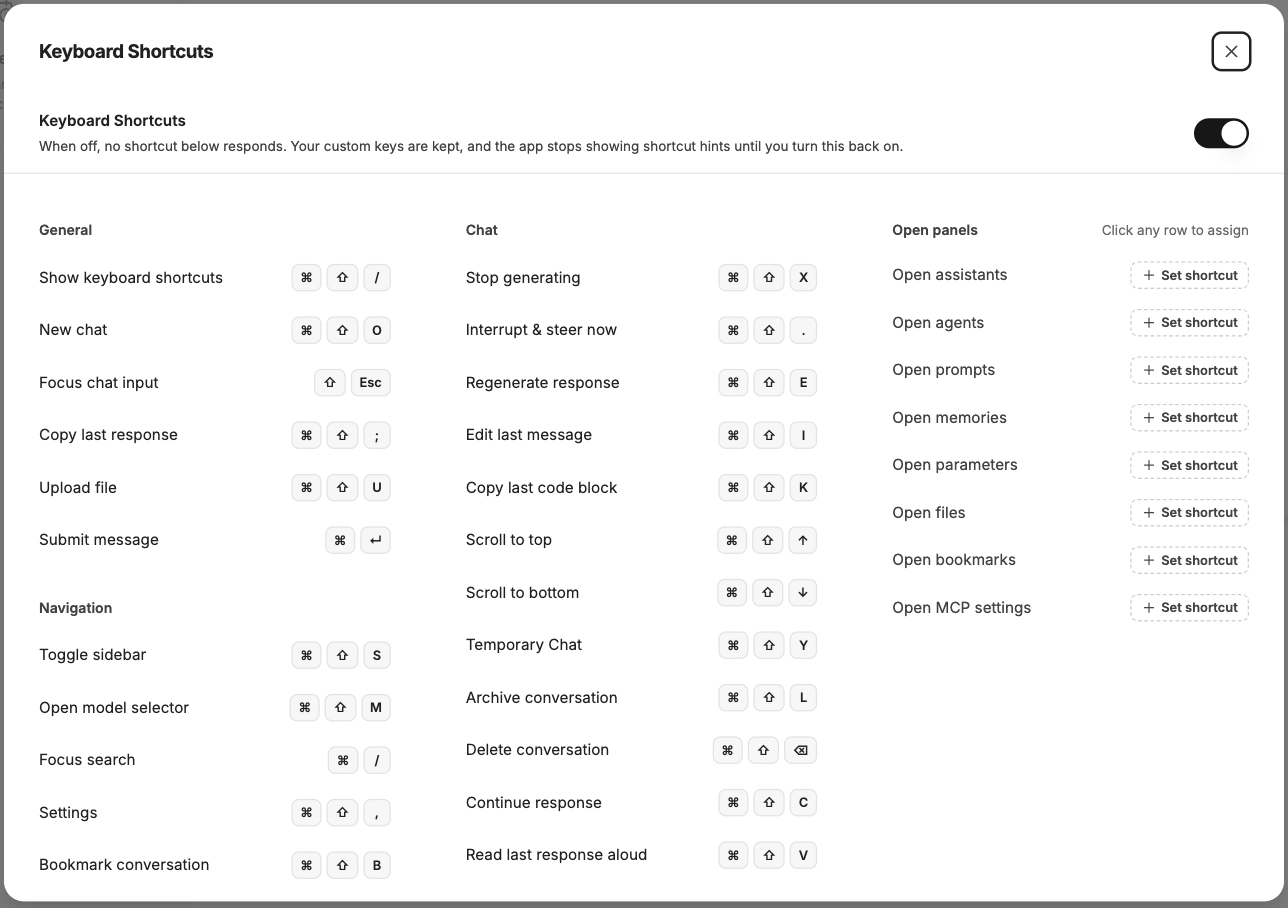
The Keyboard Shortcuts window lists every shortcut and lets you change them.
Typing and sending
| Action | Mac | Windows |
|---|---|---|
| Send your message | Enter | Enter |
| New line in your message | ⇧ Enter | Shift+Enter |
| Submit message | ⌘ ↵ | Ctrl+Enter |
| Focus chat input (jump to the message box) | ⇧ Esc | Shift+Esc |
| Upload file | ⌘ ⇧ U | Ctrl+Shift+U |
If you turn off Press Enter to send messages in Settings, Enter adds a new line and you send with ⌘ ↵ or Ctrl+Enter.
General and navigation
| Action | Mac | Windows |
|---|---|---|
| Show keyboard shortcuts | ⌘ ⇧ / | Ctrl+Shift+/ |
| New chat | ⌘ ⇧ O | Ctrl+Shift+O |
| Copy last response | ⌘ ⇧ ; | Ctrl+Shift+; |
| Toggle sidebar | ⌘ ⇧ S | Ctrl+Shift+S |
| Open model selector | ⌘ ⇧ M | Ctrl+Shift+M |
| Focus search (search your chats) | ⌘ / | Ctrl+/ |
| Settings | ⌘ ⇧ , | Ctrl+Shift+, |
| Bookmark conversation | ⌘ ⇧ B | Ctrl+Shift+B |
In a chat
| Action | Mac | Windows |
|---|---|---|
| Stop generating | ⌘ ⇧ X | Ctrl+Shift+X |
| Regenerate response | ⌘ ⇧ E | Ctrl+Shift+E |
| Continue response | ⌘ ⇧ C | Ctrl+Shift+C |
| Edit last message | ⌘ ⇧ I | Ctrl+Shift+I |
| Copy last code block | ⌘ ⇧ K | Ctrl+Shift+K |
| Scroll to top | ⌘ ⇧ ↑ | Ctrl+Shift+↑ |
| Scroll to bottom | ⌘ ⇧ ↓ | Ctrl+Shift+↓ |
| Temporary Chat on or off | ⌘ ⇧ Y | Ctrl+Shift+Y |
| Archive conversation | ⌘ ⇧ L | Ctrl+Shift+L |
| Delete conversation | ⌘ ⇧ ⌫ | Ctrl+Shift+Backspace |
Delete conversation asks you to confirm first.
Change a shortcut
In the Keyboard Shortcuts window, click a shortcut and press the keys you want. Your combination needs ⌘, Ctrl or Alt. If the keys are already used, Manas tells you which shortcut has them and offers Replace. Reset puts one shortcut back; Reset all to defaults puts them all back.
The rows under Open panels (for example Open agents, Open memories, Open files, Open bookmarks) have no keys at first. Click one to give it a shortcut.
Your own shortcuts are saved in the browser you set them in.
Good to know
- Some shortcuts only do something when it makes sense: Stop generating while an answer is being written, Edit last message when there is one.
- Some browsers or browser extensions use the same keys. If a shortcut doesn't work, change it in the Keyboard Shortcuts window.
If something goes wrong
- No shortcut works. The Keyboard Shortcuts window has a switch to turn all shortcuts off; check it's on.
- A shortcut does something else. Your browser or an extension uses those keys. Give the Manas shortcut different keys.