
If it's work, it's Manas.
Kapiva's Agent Marketplace. Pick an agent built by Kapivans — or just ask Claude, Gemini or ChatGPT — and it works with your files, the web, Slack and a cloud computer of its own. One sign-in, no personal AI subscriptions.
Pick an agent. Ask in plain words.
Open the Agent Marketplace and choose Kala. Give it a short brief; it writes the script, then the frames, then the finished video.
01 Marketplace
Built by Kapivans. Ready on the shelf.
Every agent carries its own instructions, model and tools. Open the Agent Marketplace, pick one, and it starts a chat ready for your brief.
02 Models
Stop choosing a model. Choose per message.
Frontier models are uneven. Manas keeps all three behind one conversation, so the right brain answers the right question — and adding the next provider changes nothing for you.
-
Reasons and writes with care: rewrites, careful analysis and code. Reads the images and PDFs you attach.
- Rewrites
- Analysis
- Code
- Images & PDFs
-
Swallows a 400-page document or a spreadsheet dump without blinking, and answers fast.
- Long documents
- Spreadsheets
- Quick answers
-
OpenAI's latest models for a second opinion, plus ChatGPT Images — no personal subscription needed.
- Second opinions
- ChatGPT Images
- Brainstorms
03 Cloud computer
A computer in the cloud. Just for you.
Your agents get a real computer — a web browser, a folder of files and a command line. Ask in plain words: download a video and cut a clip, turn a PDF into Word, pull every product price off a site into a spreadsheet. Start a chat with Agents → Cloud Computer.
04 In every chat
One chat box. Everything inside.
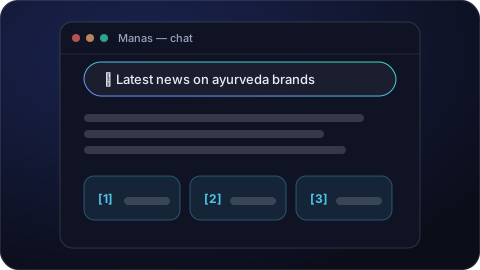
Answers from the web, with sources
Turn on web search under the message box and ask about anything recent. Every fact links to where it came from.
Self-hosted search · no third-party account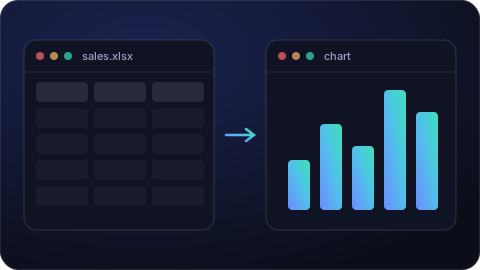
Run Code: charts and number-crunching
Attach a spreadsheet and ask for the result. Manas runs small programs to clean it up, total a column or draw a chart.
CSV · XLSX · chartsImages and PDFs
Click the paperclip, attach a screenshot, an invoice or a report, and ask about it.
Creative insights
What customers search on Amazon, say on Reddit and trend on Google — turned into ad ideas.
Memory
Manas remembers useful details you share, so the next chat starts where the last one left off.
Google Drive
Bring files in from your Drive and save the results back, with your own Google account.
05 Manas in Slack
Ask Manas right in Slack.
DM Manas and it answers as you, with your own agents and tools — connect once with your Kapiva Google account. Mention @Manas in a channel and it replies in the thread, with the agents that channel allows and never with anyone's private tools or memory.
In Slack
- Answer as you, with your agents
- DM @manas
- Reply in a channel thread
- @Manas
- Pick an agent
- +kala
- An answer only you see
- /manas
- Hand the answer to another agent
- Switch agent
- Share a private answer
- Post to channel
06 Get started
Three steps. One sign-in.
# Sign in with your Kapiva Google account
$ manas.kapiva.tech/login
# Then just ask
› Tattva, how did the gummies range sell on D2C vs marketplaces last month?
› +kala make a 20-second video about Ashwagandha Gummies
› Pull every product price off kapiva.in into a spreadsheet
- 1
Sign in
Use your @kapiva.in Google account. You land straight in your chats. Getting started
- 2
Pick an agent or a model
Open the Agent Marketplace, or choose Claude, Gemini or ChatGPT from the model menu.
- 3
Ask in plain words
Attach files, turn on web search, and refine by chat. No prompts to learn.
07 Product facts
Our workspace. Our four walls.
Where does my data live?
Manas runs on Kapiva-controlled infrastructure. Conversations, files and agent definitions live in our own database and storage — not in a vendor's product. Model calls go out through Kapiva's own accounts with each provider.
Who can use it?
Everyone with a @kapiva.in account. Sign in with Google; access follows the company identity you already use.
Do I need my own ChatGPT or Claude subscription?
No. Claude, Gemini and ChatGPT are all available inside Manas, paid for by Kapiva. Fair daily usage limits keep it fast for everyone.
Who sees my cloud computer?
Only you. No one else — and no other user's agent — sees its screen, its files or the sites you're signed in to. The agent never types your passwords; it asks you to take control and sign in.
What is it built on?
Manas is built on LibreChat, the open-source chat platform — auditable, extensible and free of lock-in.
Ask it once. Get it done.
Sign in with your Kapiva account and put the Agent Marketplace to work.
manas.kapiva.tech